A storyboard is a series of visual sketches used to plan, discuss, and revise how a scene will play before production. How did it become a production planning tool, and why has it remained useful as the tools around it changed?
01 / What is a storyboard?
What is a storyboard? A visual plan you can review in advance
Storyboarding means arranging a story or scene into shots: what to film, where to place the camera, how the characters move, and how one image connects to the next. A storyboard shows those choices in a sequence of sketches. Each panel can show character positions, action, and composition, with dialogue, sound, or camera notes added when needed.[1]
Reading a storyboard means looking both at what appears in each panel and at what happens across the sequence. It is a visual draft that can be discussed, checked, and revised before full production; shooting schedules, staffing, and budgets require other plans.
Script
Records characters, situations, action, and dialogue to explain what happens.
Storyboard
Arranges what the audience will see so the team can check composition, action, and the order of information.
Shot list
Lists the shots to capture and check, helping the crew organize work on set.
One storyboard panel does not necessarily equal one shot. A character may stand, turn, and leave the frame within a single shot, and several panels may be needed to explain that change in action. Toon Boom’s documentation allows multiple panels to describe the action within one shot; in this context, the software’s scene corresponds to the live-action term shot.[2]
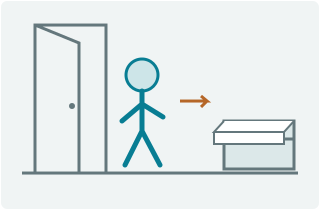
01 · Establish the space She enters the room; the drawer is on the right.
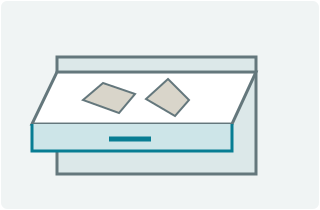
02 · Reveal the clue The drawer is open, and the papers inside are scattered.
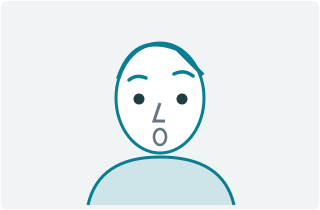
03 · Hold on the reaction She stops and realizes that someone has been there.
Figure 1. Original teaching scene: a character enters a room, discovers that a drawer has been searched, and reacts. This version uses three shots and is not taken from a film.
This version first establishes the character entering the room, then cuts to the drawer, and finally shows her reaction. The three drawings provide the space, the clue, and the reaction. Together they form one possible approach; a creator could choose different shots or change the order.
02 / Why storyboards emerged
Films already existed. Why did storyboards emerge?
Filmmakers did not wait for the modern board-based storyboard before they began making films. By 1894, viewers could watch short, arranged performances through the Kinetoscope. In 1895, cameras recorded subjects that included workers leaving a factory and a rowing regatta. On December 28 of that year, the Lumière brothers held a commercial screening in Paris. These films and screenings predated the modern board-based method developed at Disney in the 1930s by several decades.[19][18][4]
The challenge was reviewing a story that did not yet exist on screen
As Disney increased its production pace and staff in the late 1920s and early 1930s, a dedicated story department gradually took shape. Writers and story artists divided the work of turning plot into visible action and scenes. Because a story passed through many hands before completion, everyone needed to see what a character was doing, how one action led to the next, and when a gag would become clear to the audience.[17]
Those decisions shaped the performances that appeared in the finished animation. Production material for Three Little Pigs (1933) shows Walt Disney discussing how the plot could carry meaning and emotion and make the characters feel distinct. The team had to keep refining the flow of action and the audience’s understanding of each character.[5]
Written notes and multi-panel story sketches came first
A story could be described in words or sketched first. Surviving story sketches for Plane Crazy (1928) place six panels on a page and include a typed page of action notes. Words and pictures were already sharing the work of preproduction planning; planning a story did not begin with the pinboard.[17]
Words can describe plot and action, while a run of sketches shows how images relate. As a team revises a story, the questions become more specific: should an action be removed, should two images trade places, or is a necessary beat missing? Multi-panel pages can be redrawn, cut, and pasted. Arranging each drawing separately makes it possible to test another version directly.
1929 · Film year
Story sketches for The Karnival Kid
The D23 page shows Walt Disney viewing early story sketches in a photograph taken in 1966. The drawings relate to the 1929 film, but the photograph does not show the original production session.[3]
Pinning drawings to a board made revision visible to everyone
Disney’s D23 account credits story artist Webb Smith with the early-1930s storyboard concept: pinning story sketches in sequence to a four-by-eight-foot board. According to the account, artists found it easier to imagine the story visually this way than by reading a written script.[4]
From multi-panel pages to a rearrangeable board
The earlier fictional scene in which a character enters a room and finds a disturbed drawer illustrates two ways to organize drawings. In the first layout, A, B, and C share one page. In the second, the same drawings are pinned separately, and A and B trade places. The images have not changed, but the audience receives the information in a different order.
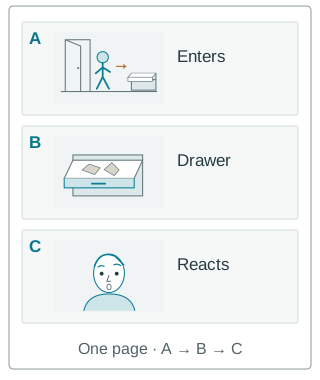
Panels on one page
A: entrance → B: drawer → C: reaction. The images and their order show how the sequence is intended to be filmed.
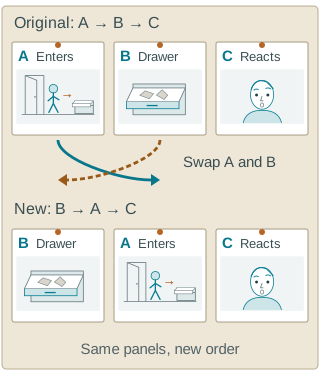
Separate cards: test another order
Move panel B (the drawer) before panel A (the entrance); leave panel C (the reaction) in place. The two rows are alternative versions, not six consecutive shots.
Figure 2. Original diagram of organizing and rearranging drawings, not a historical artifact or exact reconstruction. The format draws on the D23 account; the scene and reorder example are fictional. A multi-panel page can also be redrawn, cut, and pasted, while separate drawings can be moved directly.[3][4]
A → B → C brings the audience into the room with the character before revealing the drawer. B → A → C establishes the disturbed drawer before the character enters. Written descriptions and multi-panel sketches still work; separate drawings make different arrangements easier to lay out and compare directly.
03 / How storyboards solve problems
What does drawing the plan actually solve?
A storyboard gives the discussion something everyone can point to. In a fictional scene about hiding a letter, the creator must consider whether the character’s action is clear, whether adjacent images connect, and when the audience learns where the letter is hidden.
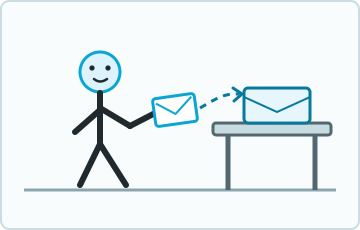
What the character does
She carries the letter toward the box. Showing both the action and its target lets the team judge whether “hiding the letter” reads clearly.
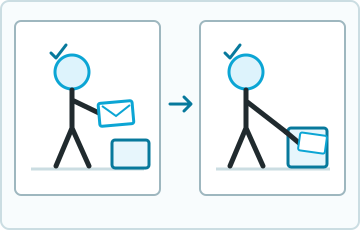
How the action connects
Both panels establish the positions of the hand, letter, and box, making it easier to check the continuity and spot a missing step.
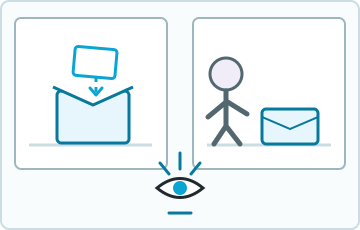
When the audience understands
Showing the letter enter the box before another character walks in lets the audience learn the secret first. The team can debate that choice before production.
Figure 3. Original diagram using a fictional “hidden letter” scene. Drawing the action lets a team check what the character does, how the action connects, and when the audience learns the information.
Give the team the same visual version to discuss
If everyone imagines the scene privately, “something feels wrong here” may refer to completely different problems. Once the images are visible, the discussion can focus on a specific panel: the hand and letter do not line up, a necessary beat is missing before the turn, or the audience learns the secret too soon. The team can compare the same visual plan instead of comparing separate mental images.
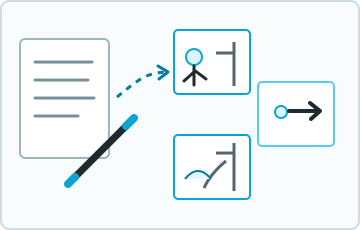
An idea becomes a visual plan
Words can describe the plot. Sketches turn “stop at the door, touch the handle, notice something wrong” into concrete images everyone can see.
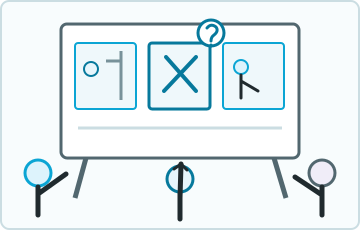
A problem points to a specific panel
Everyone is looking at the same version. Instead of stopping at “something feels wrong,” the team can point to the middle panel and ask whether the action is unclear or a necessary beat is missing.
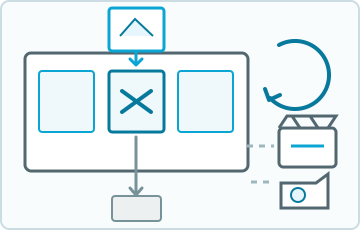
Revise the panel before production
A problem panel can be removed, redrawn, and returned before the team decides whether to move into production or go back to the board for another pass.
Figure 4. Original process diagram, not a historical artifact. The team draws an idea, reviews the same visual version, and revises panels to adjust the plan. The cycle can repeat.
Move some checking and revision before production
When the team finds a problem, it can revise a panel or change the order before moving into production. If an action is unclear, the team can draw the missing key moment. If one narrative order does not work, it can try another version. Storyboarding can also reveal new approaches to composition or performance, so the plan continues to develop through drawing and revision.[1][6]
This can reduce misunderstandings and lower the chance of overturning a plan only after the set is dressed and the actors are in place. Whether it saves work depends on the project and how the storyboard is used; creating and repeatedly revising storyboards also takes time. Lower costs and less rework are potential benefits, not guaranteed results of drawing a storyboard.
04 / How storyboards evolved
From paper to digital: how storyboards evolved and why they remain useful
Sheets of paper, pinboards, timelines, and 3D scenes did not replace one another in a simple sequence. Each brings a different question into preproduction: what the audience sees first, how long each image remains on screen, and how the camera and characters move through space.
1939 · Film year
The “Burning of Atlanta” in Gone with the Wind
A Harry Ransom Center publication reproduces storyboards for this sequence and credits production designer William Cameron Menzies. The drawings break the fire sequence into consecutive compositions and actions, giving a complex live-action sequence a visual plan that could be reviewed before filming.[8]
1954 · Film year
Storyboards and development art for Animal Farm
The BFI presents working storyboards from its collection and discusses sequences of color images mounted on black card. Some of this material sits between a storyboard and a color mood study: both serve production, but not in exactly the same way.[9]
Image order and suspense in live action
In the school sequence from The Birds (1963), Melanie smokes outside while crows begin to gather on the climbing frame behind her. When the scene cuts back, the flock has grown. She has not noticed, but the audience can already see the danger building. The storyboards published by the BFI were drawn by Harold Michelson. The drawings break that information gap into consecutive images, allowing the team to check when the suspense begins before filming.[10]
An animatic adds duration to image order
An animatic places storyboard panels on a timeline, assigns durations, and may add temporary dialogue, music, sound effects, or simple movement. Instead of reading the sequence only on paper, creators can play a timing draft, hear whether dialogue and pauses are crowded together, and see whether a reaction is too brief. It remains a preproduction version, not finished animation.[11]
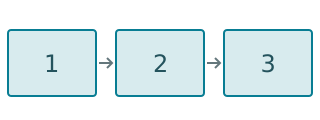
Static storyboard
The viewer sees 1, then 2, then 3.
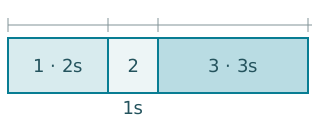
Storyboard with timing
Hold the first for 2 seconds, the next for 1, and the last for 3.
Figure 5. Different timing changes how the same three images play. The 2/1/3-second values are explanatory only, not an industry standard. This SVG illustrates timing; it is not a playable animatic.
The same three images produce a different rhythm when their durations change. A static storyboard can include written timing, but an animatic adds the ability to watch and revise the sequence at its assigned pace.
Digital tools bring drawings, timelines, and sound into one workspace
When Toon Boom released Storyboard Pro 7 in 2019, it listed drawing, script handling, camera controls, animatics, and sound editing among the capabilities of one application. This release shows how a digital workspace can combine tasks once spread across paper, editing, and audio drafts. 2019 is the release date of that version, not the beginning of digital storyboarding.[12]
3D previs tests the camera and scene in space
3D previs places simplified characters, sets, and a virtual camera in the same space. Creators can test action, viewpoints, and camera moves before deciding how to film. A 2D storyboard makes it easy to compare selected frames quickly; 3D previs makes paths and spatial relationships easier to test repeatedly. The two can work together.[13]
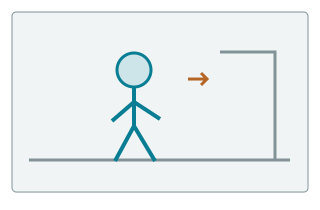
2D storyboard
How should the character and doorway be arranged inside the selected frame?
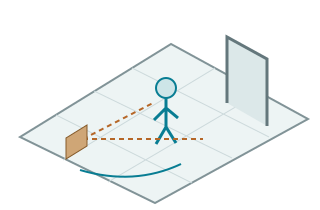
3D previs
How do the character, doorway, and field of view change as the camera moves?
Figure 6. Original comparison diagram. The 3D view is not a software screenshot or an engineering-precision model. 2D and 3D methods can work together; they are not mutually exclusive.
Why storyboards remain useful as tools change
This use does not depend on wood and pushpins. Story artists at Disney Animation still work with writers, editors, and other departments, developing rough sketches into clearer drawings while refining expressions, action, timing, and composition. They may draw on paper or use digital tools.[6]
When paper gives way to a screen, the team still needs to inspect how a sequence unfolds before full production. Arranging images in order, testing alternatives, and preserving revisions remain useful, so storyboards can change with the tools. They have not displaced writing, rehearsal, or location scouting; creators can still choose different methods for different production tasks.
05 / Storyboards and alternatives
Can you work without hand-drawn storyboards, and how should you choose a planning method?
Modern productions still face the same questions: what appears in the frame, how actions connect, where to place the camera, and which version each department should work from. A storyboard is one answer, not the only one. The right method depends on whether the hardest problem is narrative order, a real location, timing, or complex space and visual effects. The comparison below uses storyboards as a reference and shows what each alternative helps a team check; the methods can also be combined.
- Drawn or digital storyboards
- Useful for laying out a run of compositions, replacing one panel quickly, or comparing different orders. The drawings can remain rough or be refined so more departments can read them.
- Location photos and a shot list
- Discussing Landline (2017), director Gillian Robespierre said that she and cinematographer Chris Teague did not draw storyboards. They scouted together, staged scenes, took DSLR photographs, added many of them to the shot list, and adjusted on set.[20]
- Animatic
- When dialogue, action, and music need to be checked together, playing the panels adds timing information that a static page alone cannot provide.[11]
- 3D previs
- When camera moves, character paths, or spatial relationships in a virtual set are complex, a simplified 3D scene can test blocking and viewpoints.[13]
In a DGA interview, director Alexander Payne said that he does not usually storyboard, but Downsizing used some storyboards because of its visual effects and planning needs. His practice shows that the same director may change methods to suit a project’s production needs. “Usually does not” is not the same as “never,” and it does not mean arriving on set without preparation.[21]
If a scene depends mainly on how actors work within a real location, scouting, rehearsal, and photographs may address the problem more directly. If a team must compare many shots, control visual-effects transitions, or keep testing the order, a storyboard can preserve those choices. Photographs, shot lists, animatics, and 3D previs can also appear alongside storyboards in the same project.
06 / Professional storyboarding tools
Which tools do professional storyboard artists use, and what is each one suited to?
For professional storyboard artists and production teams, a tool’s value is not limited to producing one image. It also depends on whether the team can use it to revise images precisely, manage a sequence of shots, check timing, and hand the work to the next person in production. Some tools center on drawing, some connect panels to a timeline, and others use 3D sets to test camera positions.
The following comparison covers several representative approaches to professional production. The intended users and tradeoffs are judgments based on official features, not market share or performance rankings. A team must also consider its existing software, skills, and delivery requirements.
On a narrow screen, scroll the table horizontally to compare each tool’s use cases, strengths, and requirements.
Professional production tools compared by working method
| Tool | Best suited to | Main strengths | Limits and requirements |
|---|---|---|---|
| Toon Boom Storyboard Pro | Storyboard artists, animation teams, and video production teams working on projects that require repeated revision and animatic review. | Combines drawing, shot organization, panel timing, camera movement, and sound in one workflow.[34] | Requires learning the full workflow and accounting for commercial licensing costs; the software does not choose compositions or shots for the artist. |
| Photoshop | Storyboard artists who want to draw, composite, and refine each panel by hand, especially those who already work in Photoshop. | Flexible drawing and image editing; existing storyboard images can also be placed on a timeline and assigned display durations.[35][36] | This manual route still requires the artist to create the images and arrange the sequence; it is not a dedicated storyboard project-management system. |
| Clip Studio Paint | Drawing-focused storyboard artists and 2D animators whose work requires close control over characters, action, and line art. | Drawing and line-editing tools work alongside references to adjacent images and an animation timeline, helping creators check rough action.[37] | The artist still has to design and create the images. The animation timeline in PRO is limited to 24 frames; longer animation requires EX. This does not mean a static storyboard is limited to 24 panels.[38] |
| Wonder Unit Storyboarder | Independent storyboard artists, directors, and creators who need to test a story quickly; suited to rough work and existing paper sketches. | Available as a free download; supports quick drawing, panel duplication and rearrangement, action and timing notes, paper-board import, and round-trip editing with Photoshop.[39] | Its focus is rapid drawing and organization; more detailed image editing may require other software. Wonder Unit Storyboarder is not Storyboarder.ai, discussed later. |
| FrameForge | Live-action storyboard and previs artists, directors, and cinematographers working on projects that require spatial and camera-position planning. | Places characters, props, and cameras in a 3D scene to compare compositions and shot parameters, with related technical information.[40] | Requires scene, dimension, and camera data. If the model does not match the location, the previs can also be inaccurate. It is neither hand-drawing software nor a final-image generator. |
Choose a tool by working backward from the next task: if you need to draw and revise panel by panel, prioritize drawing control; if you need to check dialogue, action, and pauses together, prioritize a timeline; if you need to verify camera positions in a real location, prioritize space and shot parameters. Professional tools are also adding AI features; Storyboard Pro, for example, offers the optional Ember AI add-on. Professional production and AI assistance are not mutually exclusive categories.[34]
07 / What AI changes
What does AI change, and what remains the same?
For independent creators and small teams with limited budgets and little drawing experience, one challenge is turning an imagined scene into images that other people can understand. AI lets people begin with natural-language descriptions and reference images instead of mastering hand drawing before they can express a shot plan. Generated images can serve as a first draft for discussion and revision rather than polished final artwork from the start.[22]
How can you start storyboarding if you cannot draw?
First state what happens in the scene and what the audience should see, then add the characters, location, and visual style. A tool can propose candidate images, or you can discuss different approaches in a conversation before selecting and revising them. Story2Board’s public workflow, for example, can begin with an idea, brief, or script, then move into shot design and storyboard images.[28]
The focus of practice changes: you do not have to draw every line yourself, but you still have to express what you need, see whether one image connects to the next, and decide which image fits the story. The tool combinations, storyboard workspaces, and all-in-one platforms below can all serve as entry points, and professional teams may use them as well.
Where might AI reduce work or cost?
- Sketch production
- Replace some drawing from scratch with generating, selecting, and revising candidates, so people who cannot draw can still produce images for discussion.
- Exploring alternatives
- Try different compositions, viewpoints, or styles for an existing scene without redrawing from a blank page every time. The chosen relationships between characters and settings still need to remain clear through revision.
- Organizing delivery
- A platform with storyboard-management features can keep shot descriptions, images, and revisions in one project, reducing the need to move material between tools. This benefit comes from workflow integration, and traditional professional software can provide similar help.
The relevant comparison is the total effort required to reach a usable plan for the project, not only how quickly one image can be generated. Subscriptions or generation credits, repeated attempts, checks for character and spatial continuity, and video postproduction can all consume time and money. AI may reduce some image-preparation work for a beginner; for an experienced artist, a quick hand-drawn sketch may be more direct. Whether AI is worthwhile depends on the method it replaces.
Feature descriptions are based on official materials available as of October 10, 2026. They explain workflows, not performance or market rankings.
Combine ChatGPT with a video model
One approach is to describe a scene to ChatGPT, ask it to generate a visual draft containing multiple panels, and then revise the composition or details through conversation. ChatGPT supports generating images from text, uploading images, and continuing to edit them, but the number of panels, character actions, and continuity between images still require a creator’s review.[22]
- Plan the shots first. Specify what each panel should show, the shot order, and the character and setting features that need to remain consistent.
- Generate and check the multi-panel image. Check whether the action, space, and clues make sense. Revise the image or separate the shots into individual images when needed.
- Use it as a reference for a video model. For example, provide the multi-panel image to Seedance 2.5 and specify the action, camera movement, and visual style in the prompt.[23][24]
- Check the generated clip. Compare the actual action and shot transitions with the original plan, then decide whether to revise, regenerate, or edit.
Two input types need to be distinguished. The Volcengine Ark Seedance 2.5 guide says that a multi-panel storyboard combined into one image mainly provides a rough story reference, and the generated video will not align strictly panel by panel. When multiple independent storyboard images are supplied as keyframes, alignment to the supplied images is comparatively tighter. Giving a multi-panel image to a video model does not mean the model will reproduce it panel by panel. To control specific shots, choose the input method for the model you are using and check the result.[24]
Organize and revise in a dedicated storyboard workspace
Another route is to keep the script, shot list, images, and revision notes in one project. The focus is managing a visual plan over time, not merely obtaining one image.
- Storyboarder.ai
- Turns a script or idea into a shot list and storyboard, then allows image editing, character references, and adjustments to individual shots. It also currently offers image-to-video features, so storyboard workspaces and video generation are not completely separate categories.[25]
- Boords
- Organizes uploaded or generated storyboard images, manages panel-by-panel feedback, versions, and approvals, and assigns timing and sound to panels to create an animatic. A timeline-based animatic must be distinguished from continuous motion synthesized by a generative model; exporting an MP4 does not by itself show that the latter method was used.[26][27]
- Story2Board
- Starts with an idea or script, discusses the story and shots with an AI co-director, establishes character and setting references, then generates and revises storyboard images before organizing them into a PDF with images and camera notes. The current international site focuses on this editable visual plan and PDF delivery; video production still requires downstream tools.[28]
Continue from storyboards to video in an all-in-one platform
- Higgsfield
- Popcorn can generate storyboard frames. Its official documentation describes one handoff: use a single frame as the first frame or reference image for Kling or Veo, then generate video. This connects a shot reference to a video model; it does not mean an entire multi-panel image will automatically become a panel-by-panel film.[29]
- TapNow
- Places text, image, video, and other assets on canvas nodes. An agent can write a script, break it into shots, build a storyboard, and create image or video tasks, then pass assets to the selected model through connections or references. The reference inputs accepted depend on the model.[30][31]
- OiiOii
- Connects script, characters, settings, storyboards, sound, and video generation. Its public workflow includes confirming and revising a storyboard plan before generating or redoing shots, then handling sound effects, music, and editing. Four-panel and nine-panel previews are viewing formats within that workflow, not a promise to parse any external multi-panel image.[32][33]
Easier image generation does not remove the need for judgment
These changes let creators express ideas without relying only on hand drawing, and they make it easier to connect storyboards to later video production. But multi-panel images, individual shot references, animatics, and final video remain different outputs. When choosing a tool, check whether it accepts your material, preserves relationships between shots, allows individual revisions, and provides the format required by the next stage.
AI can help propose and create candidate images, but the creator still has to check whether they tell the same story. Attractive images or smooth motion alone cannot show when the audience receives information, why one action connects to the next, or whether the generated video has drifted from the agreed plan.
Try it with a scene
Apply storyboarding to your own story
Start with a small scene and see how Story2Board approaches AI-assisted storyboarding.
Video and further reading
Compare storyboards with the finished scene
OFFICIAL YOUTUBE · PIXAR
Up “Married Life” | Pixar Side by Side
Pixar’s official “Married Life” side-by-side for Up compares development drawings with the finished scene. It offers a way to see which composition and story decisions were already present before final materials, lighting, and performance. Adobe’s introduction to storyboarding also links to and describes this format.[1][14]
Watch the official Pixar video ↗
The link opens Pixar’s official channel. This page does not load the player automatically, so the article remains readable offline.
For more on story, character, and shot development in animation, visit Pixar in a Box, created by Pixar and Khan Academy.[15]
Sources and scope
Sources for the article
Sources · 40 references
Sources checked October 10, 2026. Numbered citations link to the material used in the article. Collection records establish artifacts and dates; institutional retrospectives and research provide historical context; interviews define the scope of individual filmmakers’ practices; software documentation and papers support only the versions or research directions described.
- Animation storyboards and how to make them. — Adobe. Definition of storyboarding and common panel information; its priority claim about origins is not used.
- About the Storyboard Structure — Toon Boom documentation. Panels and shots are not necessarily one-to-one; the software uses “scene” in a specific animation context.
- Walt Disney Reminisces About Early Mickey Mouse Artwork — Disney D23 · Jim Fanning. Story sketches for a 1929 film and a 1966 account of revisiting them.
- Storyboards — Disney D23 · Disney A to Z. Disney’s attribution to Webb Smith and its description of an early-1930s four-by-eight-foot pinboard.
- Walt Disney on Three Little Pigs — The Walt Disney Family Museum · Lucas O. Seastrom. Attention to character and story in a 1933 production; it does not establish a “first fully storyboarded film.”
- Story — Walt Disney Animation Studios. The studio’s account of storyboarding in the 1930s and in its current process.
- Drawing of Scene 12 … A Trip to the Moon — MoMA collection · Georges Méliès. The film dates to 1902; the drawing is dated about 1930–1931. Object number 945.1965.
- Ransom Edition, Fall 2014 — Harry Ransom Center · University of Texas at Austin. PDF page 11 (printed page 9): storyboards for the fire sequence in Gone with the Wind, credited to William Cameron Menzies.
- From Star Wars to George Orwell: why storyboarding matters — BFI · Chris Pallant. A 2016 article on the Animal Farm collection and the distinction between storyboards and mood artwork.
- Storyboarding terror: Hitchcock’s The Birds turns 50 — BFI · Sam Wigley. A 2013 article on storyboards for the school sequence in the 1963 film, drawn by Harold Michelson.
- How to Create an Animatic — Toon Boom documentation. Panel duration, sound, and camera movement; not used to date the invention of animatics.
- Toon Boom Animation releases Storyboard Pro 7 — Toon Boom release information. A 2019 software release example; it does not date the beginning of digital storyboarding.
- What is virtual production? — Epic Games / Unreal Engine. Only the previs section is used: testing action and shots with 3D imagery before production. Marketing benefit claims are not used.
- Up “Married Life” | Pixar Side by Side — Pixar official YouTube. Used as the official video link; the article makes no timestamped or shot-by-shot claims from it.
- Pixar In A Box — Pixar Animation Studios. Official entry point for the Pixar and Khan Academy course.
- Storyboarding bei Disney: entwicklungen, ambitionen, ordnungsmuster — Chris Pallant · Canterbury Christ Church University research record. The author’s academic summary of the complexity of early development and the problem of naming a single founder; only the public abstract is used.
- Storyboarding: A Critical History, by Chris Pallant and Steven Price — book review — Hiaw Khim Tan · Alphaville / University College Cork (2019). Printed page 236 (PDF page 4) of a book review discussing studio scale and the division of labor in the story department. This is a secondary review, not the 2015 book or independent archival evidence.
- Le Cinématographe Lumière — Institut Lumière. The March 22, 1895 demonstration and December 28 commercial screening; it does not establish a single global inventor of cinema or the planning methods of every early film.
- In the beginning: cinema’s murky origin story — BFI / Peter Domankiewicz. An arranged Kinetoscope performance in 1894 and filming of factory workers and a rowing regatta in 1895; this does not show that drawings or other preparation were entirely absent.
- Dysfunction Junction — DGA / F. X. Feeney. Fall 2017: Gillian Robespierre discusses Landline, saying that she and cinematographer Chris Teague did not draw storyboards but scouted, staged scenes, and added DSLR photographs to the shot list. The account is not extended into a claim about every department or every part of the film.
- Walking the Walk… — DGA / Steve Chagollan. Fall/Winter 2016–17 interview: Alexander Payne says he does not usually storyboard, but Downsizing used some storyboards for visual effects and planning. The film is not presented as a no-storyboard example.
- Images in ChatGPT — OpenAI Help Center. Official information on image generation, image uploads, and editing. The multi-panel storyboard is a usage example in this article, not a guarantee of panel count, continuity, or automatic connection to a video model.
- Seedance 2.5 official release — ByteDance Seed. Official release dated July 31, 2026, and multimodal reference capabilities; it does not show that the combined workflow in this article was tested end to end.
- Doubao Seedance 2.5 prompt guide — Volcengine Ark documentation. Updated October 9, 2026. A multi-panel storyboard can provide a rough story reference, but generation does not align strictly panel by panel; alignment to independent storyboard keyframes is tighter, without guaranteeing the output.
- AI Storyboard Generator — Storyboarder.ai. Its current official page supports script or idea to shot list and storyboard, editing, and image-to-video features. User-count, perfect-consistency, speed, and quality marketing claims are not used.
- Storyboard Software for Studios & Agencies — Boords. Official features for storyboard images, script-to-storyboard workflows, versions, feedback, and review; not evidence of market share or hands-on account testing.
- Online Animatic Software — Boords. Animatics with timing, sound, and a timeline; MP4 export does not equal continuous motion synthesized by a generative model.
- AI Storyboard Generator — Story2Board. Public workflow covering ideas or scripts, conversation and shot design, reference assets, image revision, and PDF export. The description of the current international site is limited to those features and does not claim built-in video generation.
- How do I use Popcorn? — Higgsfield Creator Hub. Storyboard-frame generation and use of a single frame as a first frame or reference image for Kling or Veo; not evidence that any full multi-panel image becomes video panel by panel.
- TapNow Agent — TapNow documentation. Agent scripting, shot breakdown, storyboards, and image or video tasks; the source supports the described workflow, not a hands-on output claim.
- Generate and edit video — TapNow documentation. Canvas nodes, references, and generation with a selected video model. Input conditions vary by model, with no guarantee that multi-panel images are parsed automatically.
- AI Story Film Maker — OiiOii. Script, character, setting, storyboard, music, and video-compositing stages listed on the official site. One-click professional-film and time-saving guarantees are not used.
- AI Storyboard to Video: Inside OiiOii’s Script-to-Screen Pipeline — OiiOii official article. Dated July 14, 2026. Confirms storyboards, scene and shot revision, reference material, then sound and editing. Four-panel and nine-panel previews do not establish strict parsing of arbitrary external multi-panel images.
- Storyboard Pro — Toon Boom. Drawing, revision, panel timing, and animatics; official professional-production positioning, commercial licensing, and the optional Ember AI add-on. Exclusivity claims such as “the only professional solution” are not used.
- Which Adobe app is best for digital art? — Adobe. Photoshop pixel painting, image editing, and compositing. The stated use cases are inferred from features and do not establish usage rates among professional storyboard artists.
- Animatics: what they are and how to create them — Adobe. Only the desktop Photoshop instructions for placing storyboard images on a timeline, adjusting duration, and previewing are used; other historical claims on the page are not treated as verified.
- Animation software for beginners and professionals — CELSYS / Clip Studio Paint. Drawing, vector lines, adjacent-image assistance, and an animation timeline. It is not described as an automatic script-to-storyboard service.
- How can I create an animation with more than 24 frames? — Clip Studio Support. The animation timeline in PRO and DEBUT is limited to 24 frames; more requires EX. This is not a limit of 24 static storyboard panels or 24 seconds.
- Storyboarder — Wonder Unit. Available as a free download; supports rapid drawing, rearrangement, action, dialogue, and timing notes, paper-board import, and Photoshop round trips. It is not Storyboarder.ai, and this source does not support promises about maintenance frequency, system compatibility, or unconditional MIT redistribution.
- FrameForge Features & Benefits — FrameForge Studio. 3D sets, virtual camera positions, shot parameters, and related technical information. It is not a hand-drawing or final-image generation tool and does not guarantee that a real shoot will be feasible.
Source notes: materials and scope
- A Georges Méliès scene drawing in MoMA’s collection depicts the 1902 film A Trip to the Moon, but the museum dates the drawing to about 1930–1931. The drawing was made years after the film appeared, so it cannot show that this particular work was used to plan the 1902 production.[7]
- The tool and platform capabilities in sections 6 and 7 are based on publicly available official material, not hands-on testing in logged-in accounts or generation runs. Combined-tool routes are usage patterns based on those capabilities, not completed performance tests. The Story2Board description is limited to the workflow available on its current international site.
- Historical images are available through links to the institutions that hold or present them; they are not reproduced here. The Pixar link leads to the official channel. The video was not viewed for this article, and no timestamps or shot-by-shot reading are provided.
- The account of Disney’s board-based method draws on institutional retrospectives and research. The story department and Plane Crazy material come from Tan’s review of Storyboarding: A Critical History. Pallant’s research abstract describes early storyboarding as a combination of practices rather than one founder’s single invention.[16][17]
- The article uses documented examples from film and animation history. Disney’s institutional attribution is not expanded into a claim about a single inventor worldwide.
- All six figure groups and fifteen SVGs are original explanatory graphics. The two rows in Figure 2 show alternative ABC and BAC versions, not six consecutive shots. Historical artifacts remain available through institutional links and are not reproduced here.
- The film was not viewed for this article. The discussion of The Birds is limited to the school scene and the Harold Michelson boards described by the BFI; it does not add bird counts, timestamps, or further shot-by-shot claims.