Disney Research's Generative Motion Rig is useful for Story2Board because it does not treat AI animation as a render button. It treats AI motion as something an artist can pose, sample, drag, extend, edit, and hand back to a traditional rig.
That distinction matters. A storyboard tool can generate a nice motion preview, but if the only revision path is "try another prompt," the animator has lost control. The Disney Research paper describes a better interface: a Blender plugin that puts a generative motion model behind familiar rig controls.
A Generative Motion Rig for Artist-Driven Motion Authoring is a short SIGGRAPH Talks 2026 paper by Buhmann, Agrawal, Borer, Vögeli, Sumner, and Guay. The PDF is only three pages, but it is dense in product decisions. It shows how a general motion model can sit inside real animation software without asking artists to abandon keyframes, handles, mocap, or FK polish.
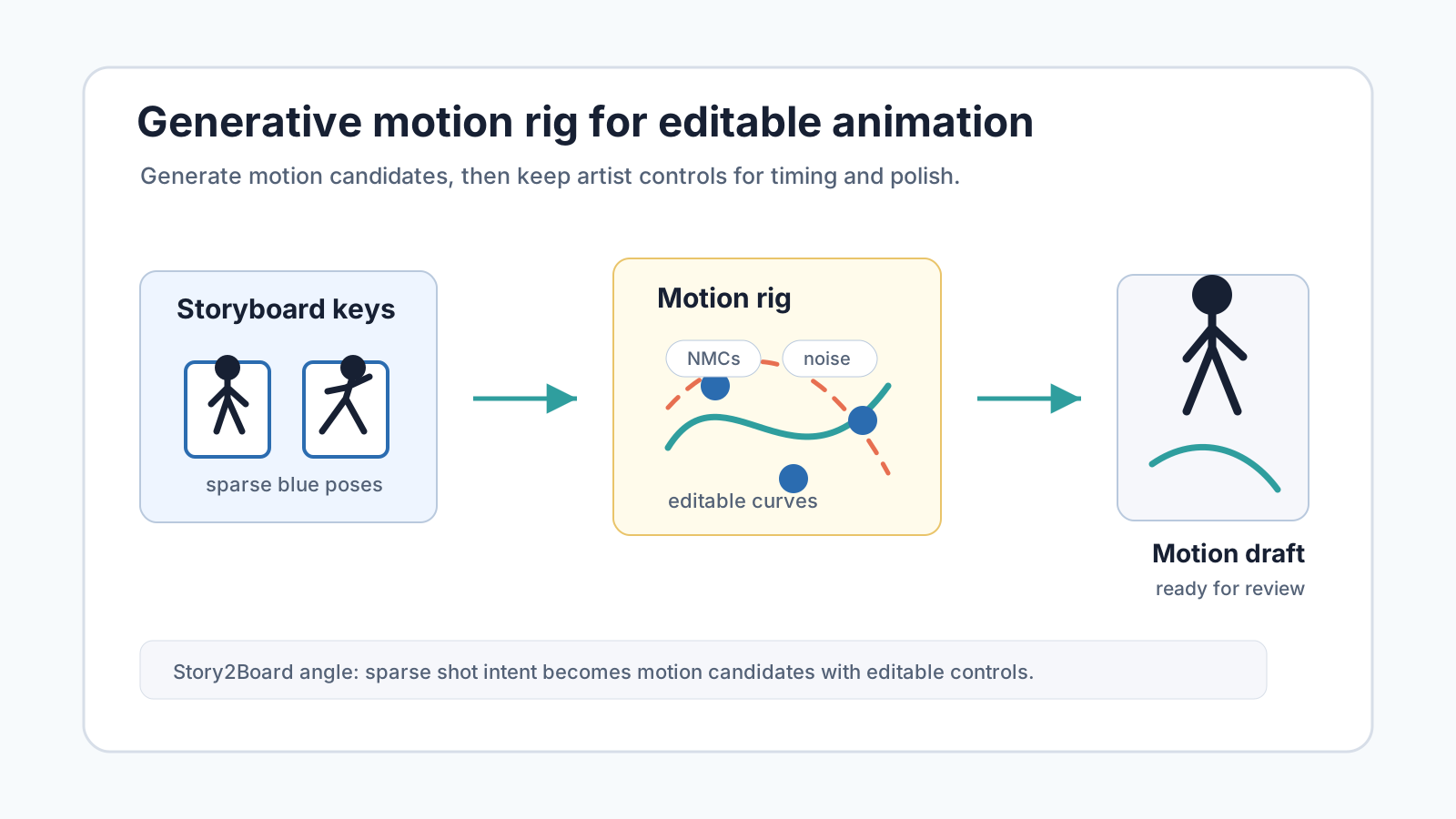
For Story2Board, the takeaway is straightforward: AI motion preview should stay editable. The first generated movement is not the final animation. It is a draft that should preserve handles for timing, poses, and cleanup.
The paper in one sentence
The Generative Motion Rig is a Blender plugin that lets artists create and edit character motion by combining sparse poses, neural motion curve handles, window length, and noise sampling, while the generative model runs on a GPU server.
The paper's important claim is not that generative animation exists. Many models can in-between motion or synthesize character movement. The useful claim is that generative motion can be exposed like a rig.
| Traditional animation tool | Generative Motion Rig equivalent |
|---|---|
| full keyframe | full-body constraint |
| control handle | sparse joint constraint |
| graph editor curve | neural motion curve |
| timing edit | move constraints on the timeline |
| alternate take | resample noise |
| mocap cleanup | preserve base motion, regenerate selected parts |
| FK polish | switch generated pose back to traditional rig |
This is closer to how production animation works. Artists do not only ask for motion. They shape it.
Why this matters for storyboard animation
Storyboards are often treated as static frames. That is still the right default. A board decides framing, action, staging, and story order before the team spends time on final animation.
But many boards need motion judgment before final production. A chase, dance, fall, handoff, creature movement, stunt, or comedy beat may look fine as still panels and fail once timing is visible. This is the gap between a storyboard and an animatic.
The usual AI shortcut is to run image-to-video on each panel. That helps, but it creates a new problem. The generated clip may have good energy, wrong foot placement, bad timing, or a pose pop. If the creator cannot edit the motion directly, they have to regenerate until a lucky version appears.
Disney's rig suggests a better pattern:
- Use the storyboard to define action and key poses.
- Generate motion between those poses.
- Let the artist drag sparse handles and timeline constraints.
- Sample variations when the acting choice is still open.
- Switch to a traditional rig for polish when the motion direction is approved.
That keeps AI in the rough-blocking phase where it is most useful.
The client-server design is the first product lesson
The paper describes a client-server setup. Blender or another animation tool is the client. The model runs on a dedicated GPU server. When the artist modifies keyframes, handles, or other motion-affecting data, the client sends those constraints to the server. The server returns updated motion.
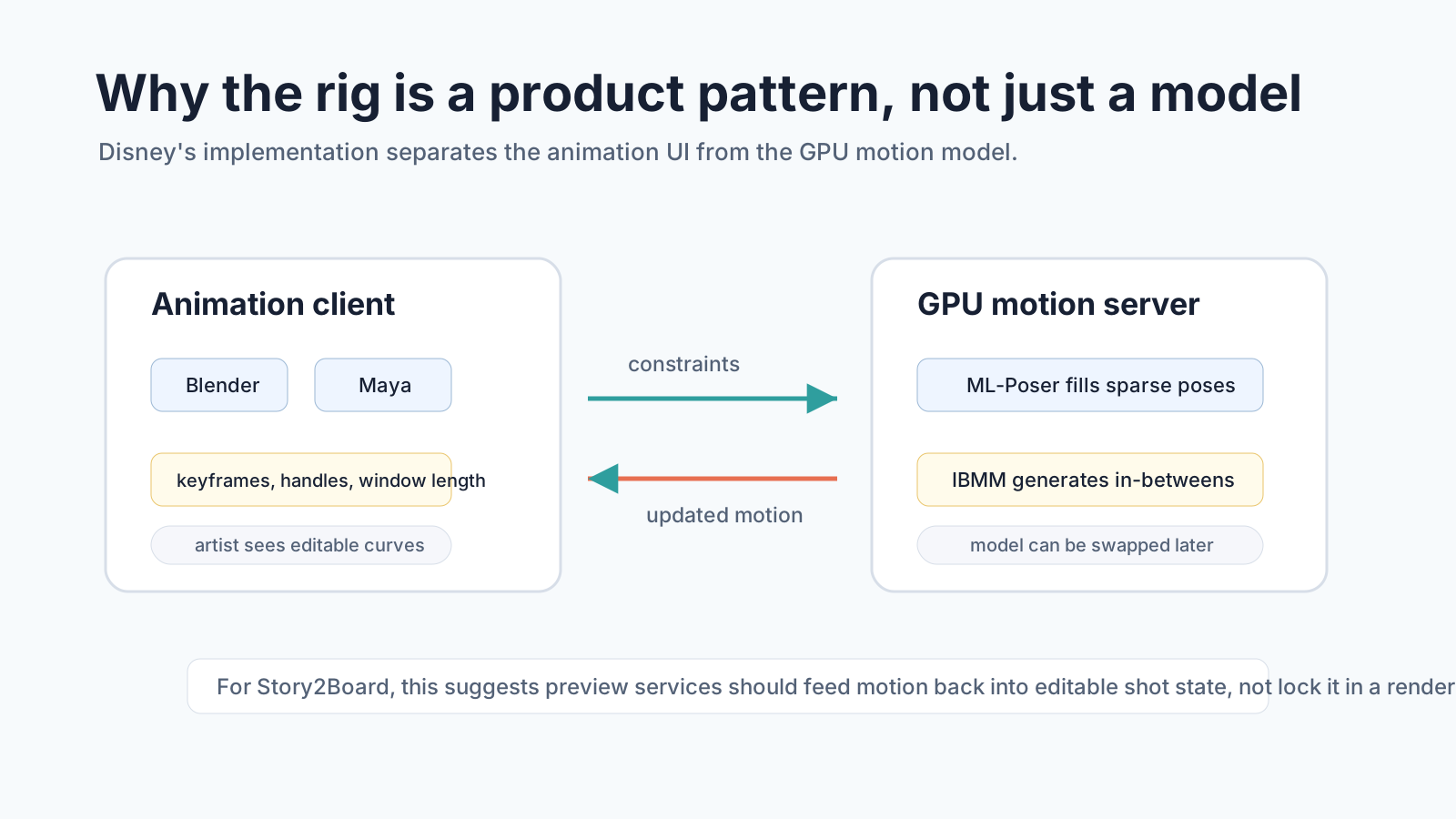
This is not just an engineering convenience. It is a workflow decision.
Animation tools often have restrictive plugin environments. Motion models want GPUs, model dependencies, and rapid iteration. Splitting the two lets the artist keep a familiar UI while the research system can change behind it.
Story2Board has a similar shape. The storyboard UI should not become a model lab. The visible surface should stay about scenes, shots, characters, props, timing, references, and notes. The heavy motion model can live behind a service boundary.
The important contract is the data passed across that boundary:
| Story2Board field | Motion service use |
|---|---|
| action | tells the model what movement must read |
| characters | binds the motion to named performers |
| props | identifies objects that constrain body motion |
| camera_movement | separates camera intent from body motion |
| duration_sec | sets the temporal window |
| notes | carries staging, style, safety, or polish constraints |
| reference_urls | supplies visual anchors for character and prop consistency |
That is why structured shot state matters. A plain prompt is a weak API.
What artists can control
The paper lists several authoring capabilities. Each one maps to a real storyboard review problem.
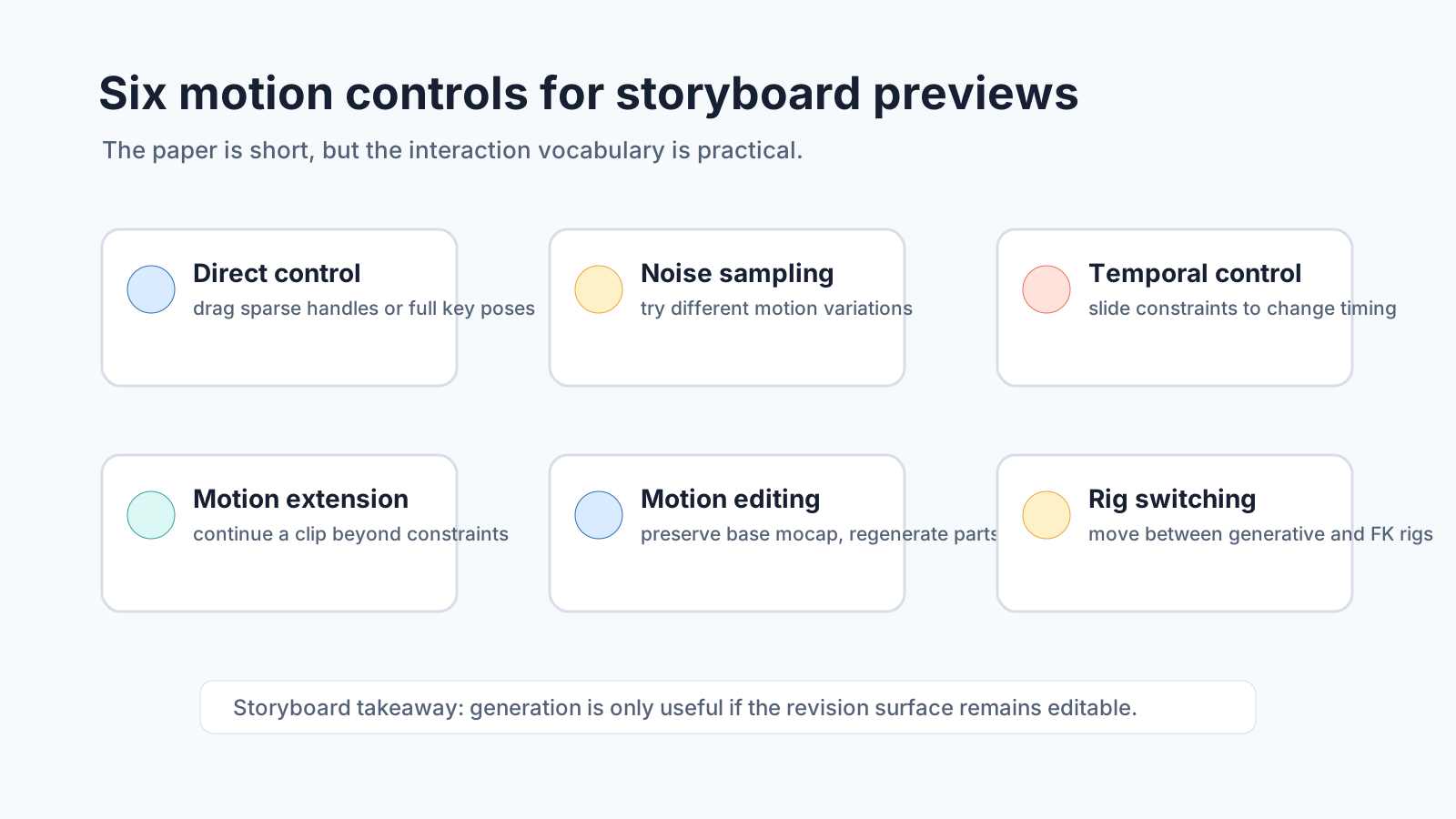
Direct control. Artists can use sparse joint-wise constraints or full keyframes. The paper gives examples such as changing a foot pattern by moving sparse foot constraints, or turning walking into spinning or falling by rotating a hip constraint.
For storyboard previews, this means a creator should be able to correct "where the hand lands" without rewriting the whole scene.
Noise manipulation. The rig lets users resample the initial noise for the whole interval or locally for a timestep. The paper notes that resampling positional components can change the motion outline, while resampling orientation can preserve the overall shape but alter a pose at that moment.
That matters because animators often need alternate takes. A character can climb, stagger, hesitate, or lunge in several valid ways. The board may not need the final choice yet.
Temporal control. Constraints can be moved along the timeline. Moving a constraint earlier makes the model hit the pose sooner. The paper uses a simple example: a walk can become a sprint.
This is exactly the kind of control missing from many image-to-video previews. Timing is not decoration. In storyboard review, it can decide whether a gag lands or a threat feels sudden.
Motion extension. The rig can predict beyond the provided constraints. That allows an artist to keep extending a clip forward while shaping it with sparse handles.
For Story2Board, this maps to animatic iteration: generate a 2-second action beat, then extend it if the beat needs more anticipation, follow-through, or recovery.
Motion editing. The rig can preserve base motion, including mocap, and regenerate selected parts through an inpainting strategy. The paper demonstrates editing a captured jumping sequence by changing jump distance and adding a backward step.
That is a bridge between AI and real production data. A storyboard system should not assume every motion starts from scratch. Sometimes the right input is a mocap clip, a reference performance, or a previous AI take.
Animation layering and rig switching. The rig coexists with a traditional rig. Artists can transfer poses between the generative rig and FK controls, use synchronize mode, and blend influence across parts of a sequence.
This is the most important production lesson in the paper. AI motion has to survive handoff. If it cannot become editable animation data, it stays a demo.
The two user tests are small but useful
The paper reports three workflow demonstrations rather than a large benchmark.
In the freestyle test, a professional artist created a long chase between two characters. The final clip was 22 seconds and was authored in less than two days, including time spent learning the tool and storyboarding the shot. The artist liked the speed for building full motion, especially in dynamic parts, but found polishing and finalizing harder. The paper also notes that sampling different movements and using window length as a motion control was unfamiliar.
That is a realistic result. Fast blocking is valuable. Final polish is still hard.
In the guided parkour test, two users had 1.5 hours to complete a 45-second animation: one professional artist and one author with no animation experience. The non-artist used many visible neural motion curves and mixed full-body and sparse constraints. The professional artist used ML-Poser to lay out full-body keyframes, then used sparse constraints for cleanup.
The key result is not that both produced the same motion. They did not. The key result is that the tool supported different working styles. The paper says the non-artist would not have been able to create a similar animation without the generative rig.
That is relevant to Story2Board. Our users are not all animators. Some are directors, writers, marketers, educators, solo creators, or previsualization generalists. The system should let a non-specialist rough in motion, while still giving a professional a route to refine it.
What this changes in a storyboard workflow
The Generative Motion Rig points to a practical middle layer between storyboard panels and final video.
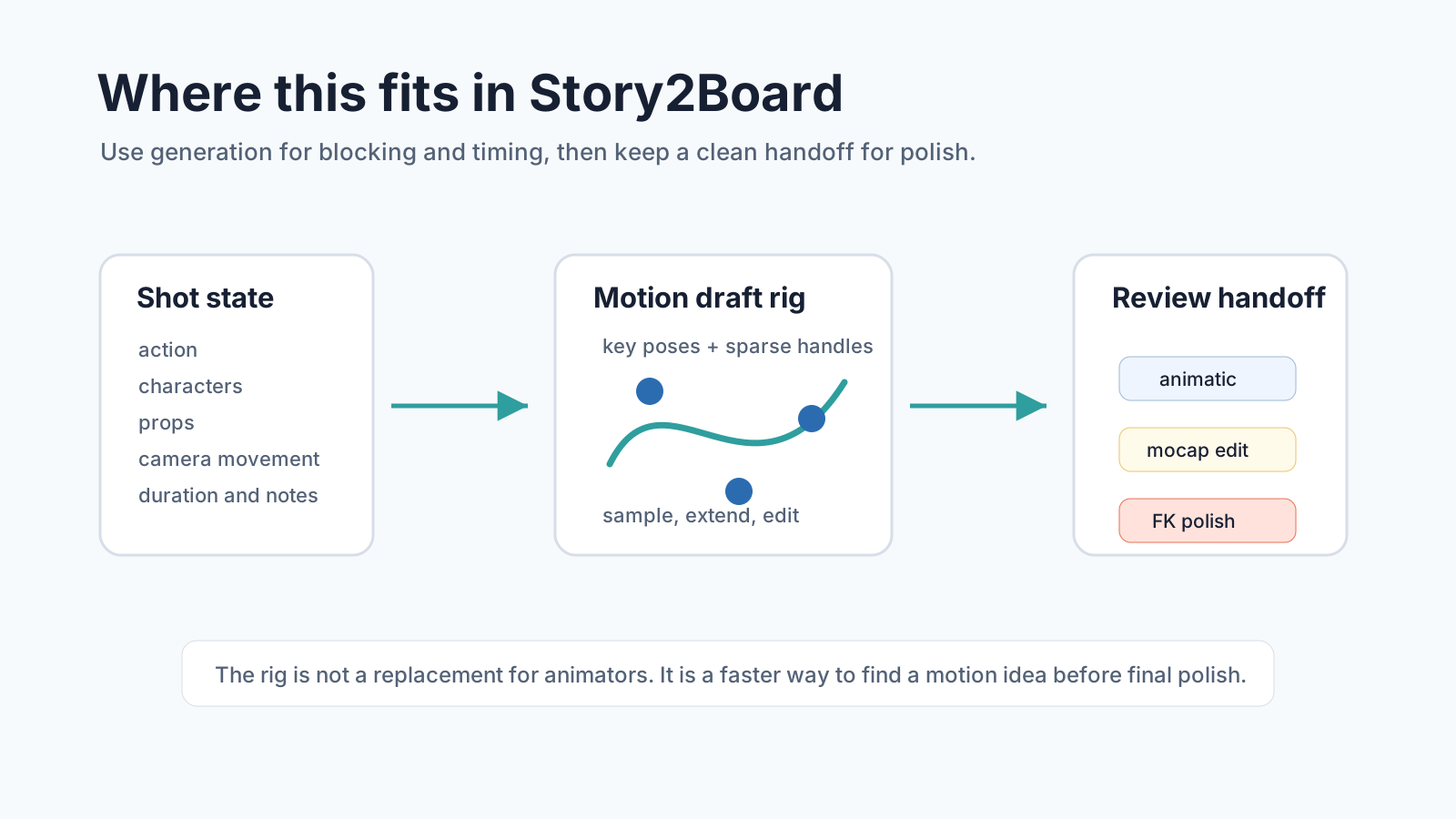
The current failure mode for AI storyboard-to-video is too binary:
| Step | Common AI workflow |
|---|---|
| Panel approved | send image and prompt to video model |
| Motion wrong | rewrite prompt |
| Motion closer | regenerate |
| Needs precision | manual fix outside the AI tool |
A motion-rig approach gives a better loop:
| Step | Rig-based workflow |
|---|---|
| Panel approved | extract key poses and constraints |
| Motion rough | generate draft motion |
| Timing wrong | move constraints on the timeline |
| Acting wrong | sample a variation or edit handles |
| Mocap available | preserve base motion and regenerate only the weak part |
| Direction approved | transfer key poses to a traditional rig for polish |
This is not only for 3D character animation. The product principle also applies to 2D animatics and video previews: generated motion should expose the smallest useful set of controls for revision.
How it compares with nearby papers
This paper sits near several recent systems we have already covered, but it has a different center.
| Paper | Main control object | Product lesson |
|---|---|---|
| SCAIL-2 | reference video conditioning | preserve rich motion cues instead of reducing them to skeletons |
| ShotPlan | planning tokens for cuts and camera events | put timing control inside the generation process |
| GraphVid | directed interaction graph | make object interactions editable |
| Disney Generative Motion Rig | artist-facing motion handles | keep generated animation controllable after the model responds |
The Disney paper is less about model scores and more about interface design. That is why it belongs in the Story2Board research stack. A better model is useful. A better edit loop is often more useful.
Limits and open problems
The authors are direct about the remaining problems.
First, generative models are bound by training data. If an artist wants non-physical movement, heavy stylization, or a character morphology outside the model's training distribution, the rig may not help enough.
Second, blending generated motion with traditional animation is still open. The paper's layered approach is a start, but consistency can break when sources mix. Physical motion, stylized acting, and animator cleanup do not always agree.
Third, stability is still a problem when adding new constraints. The paper notes that regenerating with a previously predicted pose as a condition can change the generated motion and cause a pop in synchronize mode.
Fourth, scaling to more complex rigs and different character morphologies remains unresolved. A human biped is one case. A cartoon creature, multi-limbed fantasy character, robot, or stylized mascot can be much harder.
For Story2Board, those limits argue against overpromising. We should position motion generation as preview and blocking, not final animation. The review UI should make that clear.
A practical Story2Board interpretation
If we applied this idea to Story2Board, I would not start with a full Blender-style graph editor. I would start with a motion draft layer tied to the shot form.
The user would approve a storyboard panel, then choose a motion intent:
Shot 08
Action: Mara vaults over the broken counter.
Duration: 2.5 seconds
Camera movement: tracking left
Motion notes: lead with right hand, land off balance, keep backpack visible
Story2Board could compile that into:
| Motion constraint | Source |
|---|---|
| first pose | storyboard panel |
| target pose | user selected or generated key pose |
| temporal window | duration_sec |
| active body/prop notes | action and props |
| camera separation | camera_movement |
| review target | narrative_purpose |
The preview would generate a motion draft. The user would then adjust a small set of controls: shift the landing later, pin the hand to the counter, sample a less athletic variation, preserve a previous take's start, or send approved key poses to a downstream animation tool.
That is much better than asking for prompt poetry.
The takeaway
Disney's Generative Motion Rig is a reminder that AI tools for animation should be built around revision, not output. The generated sequence is only useful if artists can still touch it.
For Story2Board, that means motion previews should be connected to shot state, key poses, timing windows, references, and handoff data. The model can fill the gap between storyboard panels, but the creator still needs handles.
Reference
Buhmann, J., Agrawal, D., Borer, D., Vögeli, L., Sumner, R. W., & Guay, M. (2026). A Generative Motion Rig for Artist-Driven Motion Authoring. SIGGRAPH Talks '26, Los Angeles, CA, USA. ACM. https://doi.org/10.1145/3799818.3812088
Source page: Disney Research Studios
All diagrams were created by the Story2Board team for this analysis.