GraphVid is interesting for Story2Board because it treats motion as a relationship, not a trail of pixels.
Most controllable image-to-video systems ask the user to draw trajectories, masks, flow, or bounding boxes. That can work for a single object moving across a clean frame. It becomes clumsy when the scene has two people, a prop, contact, occlusion, and a camera note. A storyboard artist usually does not think, "move this point 83 pixels to the right." They think, "she pulls the cloth upward," "he pushes the door open," or "the child hands the toy to the parent."
GraphVid, by Shah et al. (2026), is a paper about making that kind of intent editable. It represents a scene as a directed interaction graph, then turns the graph into conditioning tokens for a frozen video diffusion transformer.
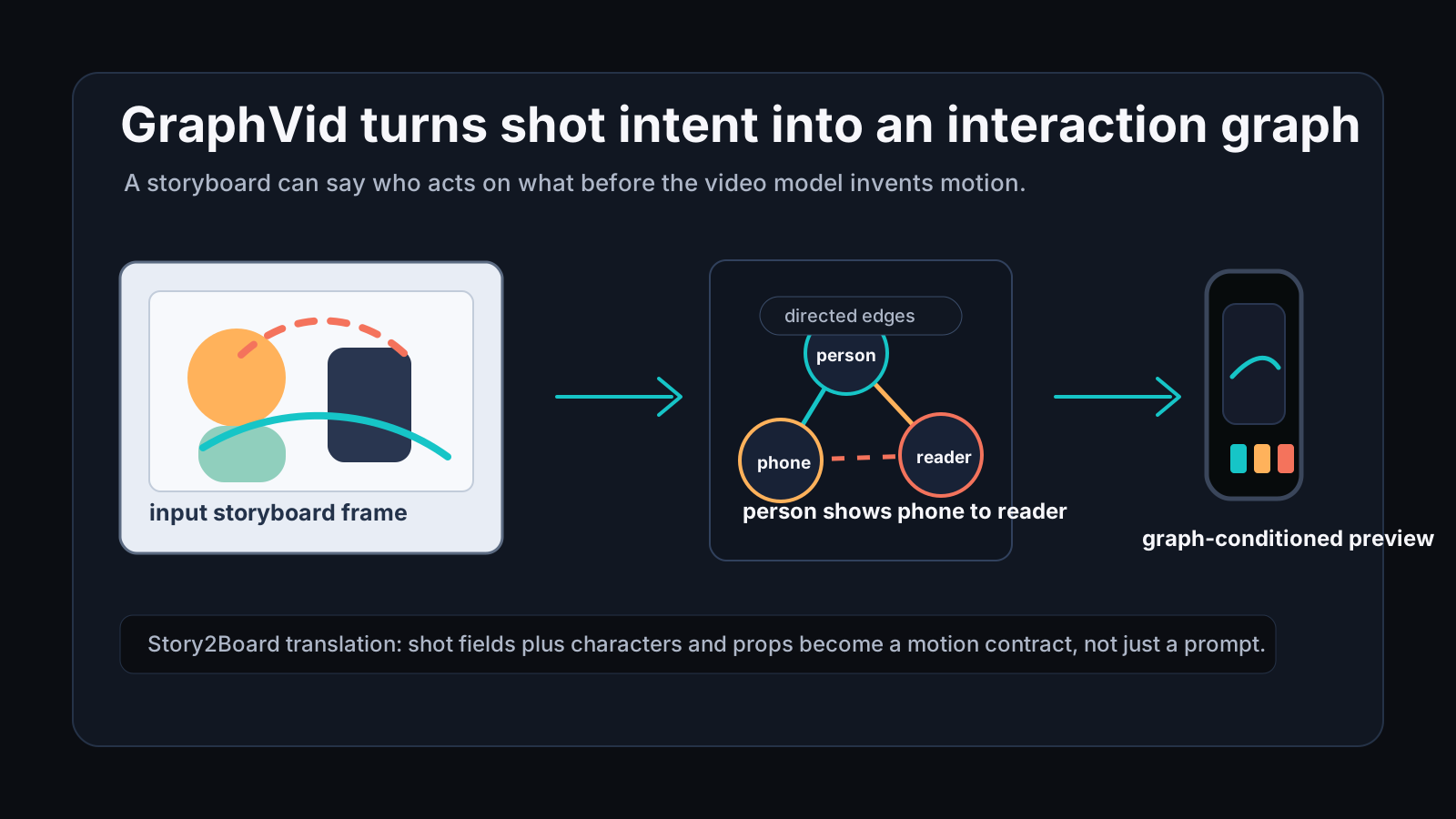
For a storyboard product, this is close to the right abstraction. A shot is already a structured object. It has characters, props, action, camera movement, duration, emotional tone, narrative purpose, sound notes, and references. GraphVid gives us a research-backed way to think about how those fields could drive motion, instead of being flattened into one long prompt.
The paper in one sentence
GraphVid controls image-to-video generation by letting users edit a directed scene graph of object interactions, then using an edge-aware graph network and LoRA adapters to condition a frozen video DiT.
That sentence has three parts that matter:
| Part | Why it matters for storyboards |
|---|---|
| Directed interaction graph | expresses who acts on what |
| Edge-aware graph reasoning | keeps the relation type inside the representation |
| Frozen video backbone with LoRA | adds control without retraining the whole model |
The paper's examples are simple to read: a person moves a phone toward a payment terminal, a dancer pulls a skirt outward, one subject leans toward another. The user edits the graph, not a dense flow field. The model then generates the video from the input frame and the edited interaction graph.
That is the same direction we want from an AI storyboard preview. The creator should be able to say which character acts, which object changes, and what physical relationship should hold. The system should not force them to redraw low-level motion every time the shot is revised.
Why trajectories are awkward storyboard controls
Trajectory control is useful, but it is a low-level handle. It asks the user to predict a path before the model has generated the motion. In a complex shot, that creates several problems.
| Storyboard situation | Why a trajectory is weak |
|---|---|
| Two actors touch, push, or hand over an object | the important fact is the causal relation, not the path of one point |
| A prop is partly hidden | drawing a precise track may be impossible |
| Multiple objects move together | errors in one path can make the whole shot physically wrong |
| A director changes the action verb | "push" to "pull" should be one relation edit, not a redraw |
| Camera motion and object motion overlap | pixel movement may come from the camera rather than the subject |
GraphVid's core argument is that many video dynamics are relational. Motion comes from an actor pushing, holding, lifting, pulling, supporting, rotating, or colliding with something. The directed edge carries that causality.
This maps cleanly to storyboard language. A panel note like "Maya pulls the curtain open" already has a graph shape:
Maya --pulls / lateral / medium force--> curtain
A graph is not only a data structure here. It is a creator-facing editing model.
How GraphVid works
The system starts with a conditioning image. It detects objects, creates nodes, and attaches object labels, visual crop features, and bounding box coordinates. It then encodes directed edges with open-vocabulary text such as "person pulls skirt upward" or "hand tilts cup backward."
Those nodes and edges go through an edge-aware Graph Isomorphism Network. The important detail is that edge attributes are part of message passing. A normal graph convolution can tell the model that two objects are connected. GraphVid wants the model to know whether the relation is push, pull, hold, support, contact, or something else.
After graph reasoning, each node embedding is projected into the video transformer's latent size and used as a conditioning token. The video backbone stays frozen. The trainable parts are the GNN, the graph-to-token adapter, and LoRA modules in the transformer's attention projections.
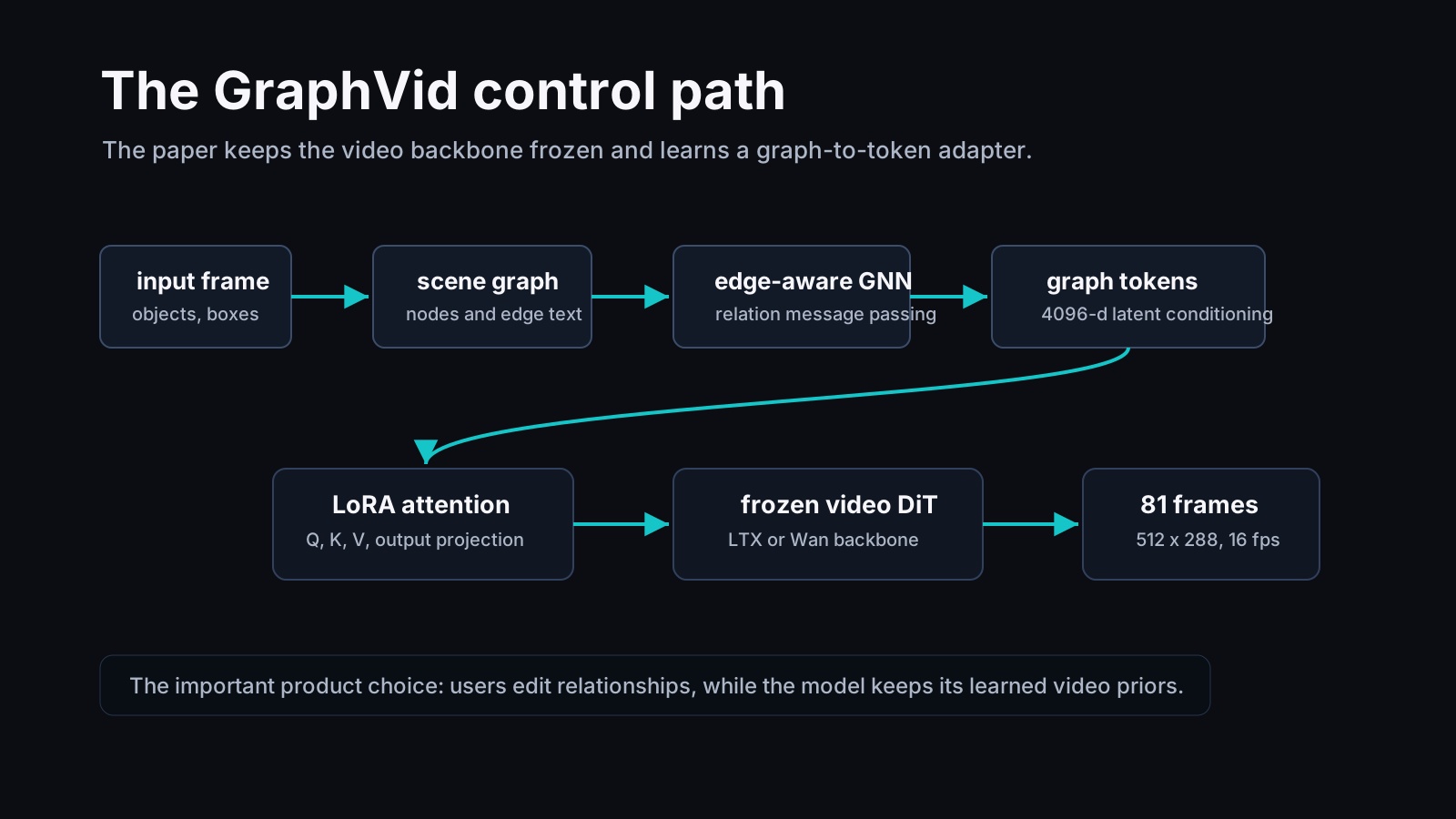
That design choice is practical. The paper does not ask every product team to train a new video foundation model. It keeps the pretrained video prior and learns a structured control path into it.
For Story2Board, this suggests a similar split:
| Layer | Job |
|---|---|
| Storyboard state | stores characters, props, action, shot size, camera movement, notes |
| Interaction graph | compiles the active relations inside a shot |
| Preview model | turns the shot state into a short motion draft |
| Creator review | edits graph relations when the motion is wrong |
The graph should not replace the storyboard. It should be a motion-facing view of the storyboard.
GraphVid-Bench matters
The paper also introduces GraphVid-Bench, an interaction-centric dataset of about 27K video clips paired with structured interaction graphs. Each clip is standardized to 81 frames at 16 fps. The dataset averages 7.76 nodes and 4.85 edges per graph. It contains 10,982 single-interaction samples, 12,641 multi-interaction samples, and 3,881 no-interaction samples.
The curation pipeline is useful because it filters out the wrong kind of motion. The authors use a vision-language model to classify whether a clip is dominated by discrete object interaction, camera motion, ambient environmental motion, ego motion, or static content. Clips dominated by camera movement, water, fire, wind, or similar ambient motion are removed for this training purpose.
That is a good reminder for storyboard systems. Not every visible movement should become an object interaction edge. If the background shifts because the camera pans, the relationship graph should not invent hundreds of moving trees and walls. It should keep the camera note separate from object physics.
What the numbers say
On the interaction-centric MoveBench subset, GraphVid reports competitive results with much less trainable scale than several motion-control baselines. Compared with Motion-I2V, it reduces FID from 28.32 to 17.02 and FVD from 159.32 to 99.42, while improving PSNR from 9.87 to 15.98 and SSIM from 0.38 to 0.61.
Compared with WISA, a physics-centric text-input baseline, GraphVid reduces FID from 25.98 to 17.02 and FVD from 107.89 to 99.42. It also reports lower EPE than comparable-scale trajectory methods.
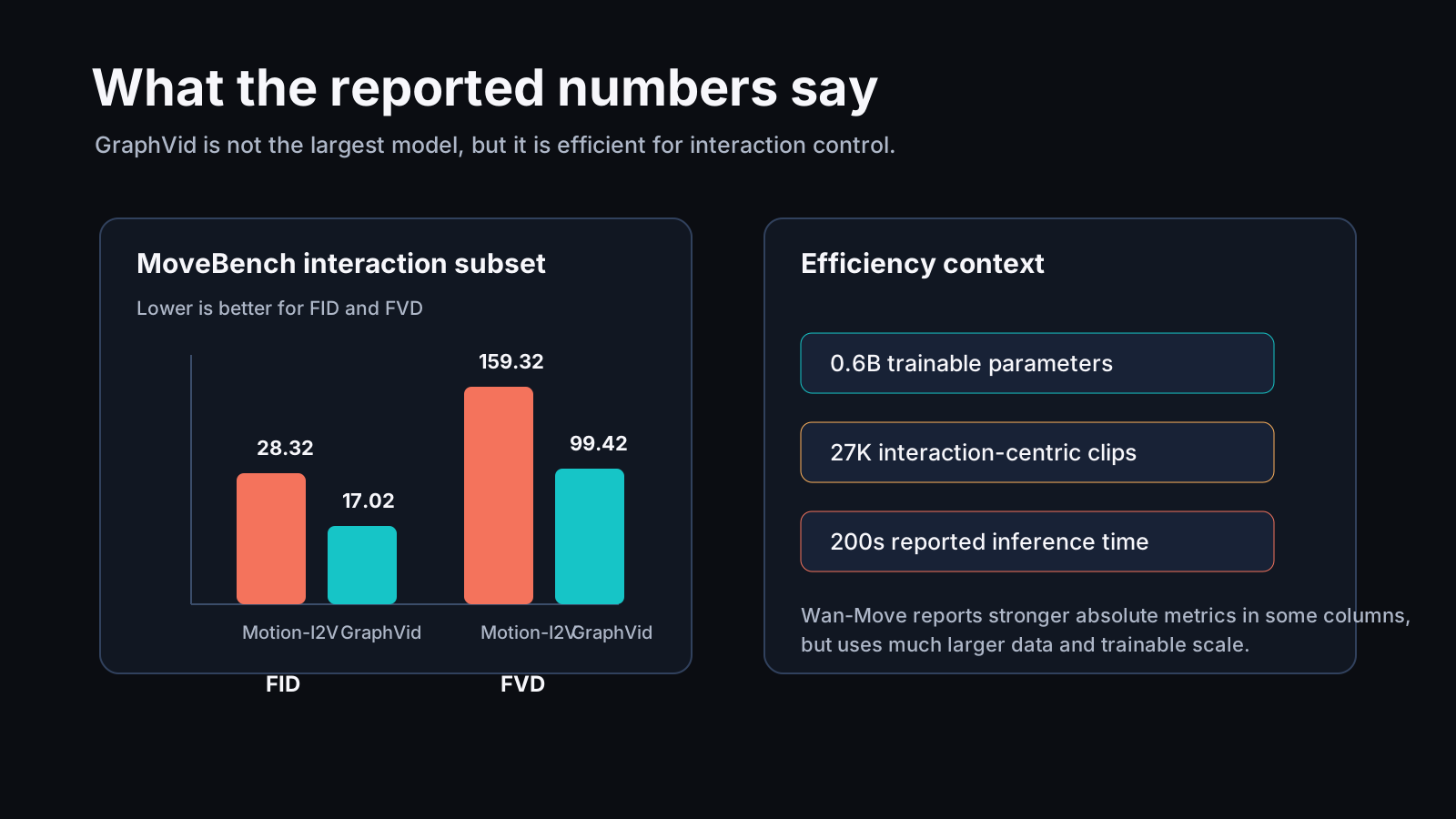
The scale context matters:
| Method | Training data | Trainable params | Reported inference time |
|---|---|---|---|
| Wan-Move | 2M | 14.5B | 1800s |
| Motion-I2V | 10M | 1.2B | 790s |
| Tora | 630K | 5B | 1200s |
| WISA | 80K | 1B | 1000s |
| GraphVid | 27K | 0.6B | 200s |
Wan-Move is still stronger in some absolute columns, and it is trained at a much larger scale. GraphVid's useful claim is narrower: structured interaction graphs can be an efficient control interface, especially when the task is multi-object interaction rather than general motion quality.
The ablations make the point clearer.
| Ablation | Result |
|---|---|
| Topology-only graph improves over text plus image | graph shape helps localize motion |
| Full graph beats graph without edge text | edge semantics disambiguate relations such as push and pull |
| Node-only graph encoder is weaker than full edges | relationships are not optional decoration |
| Too many padded nodes hurt | a tight active graph beats a huge sparse graph |
| LoRA rank 128 performs best among tested ranks | the adapter needs enough capacity for interaction control |
The lesson for Story2Board is not "copy every number." The lesson is that relation edges carry real signal. If a storyboard system stores characters and props but never models the active relation between them, it throws away the part that predicts motion.
Mapping GraphVid to Story2Board
Story2Board already has shot fields that line up with this paper better than a plain prompt box does. In our shot model, a shot can include action, shot size, angle, camera movement, duration, emotional tone, narrative purpose, sound design, notes, characters, props, image history, and reference URLs.
GraphVid gives us a way to compile a subset of those fields into an interaction graph.
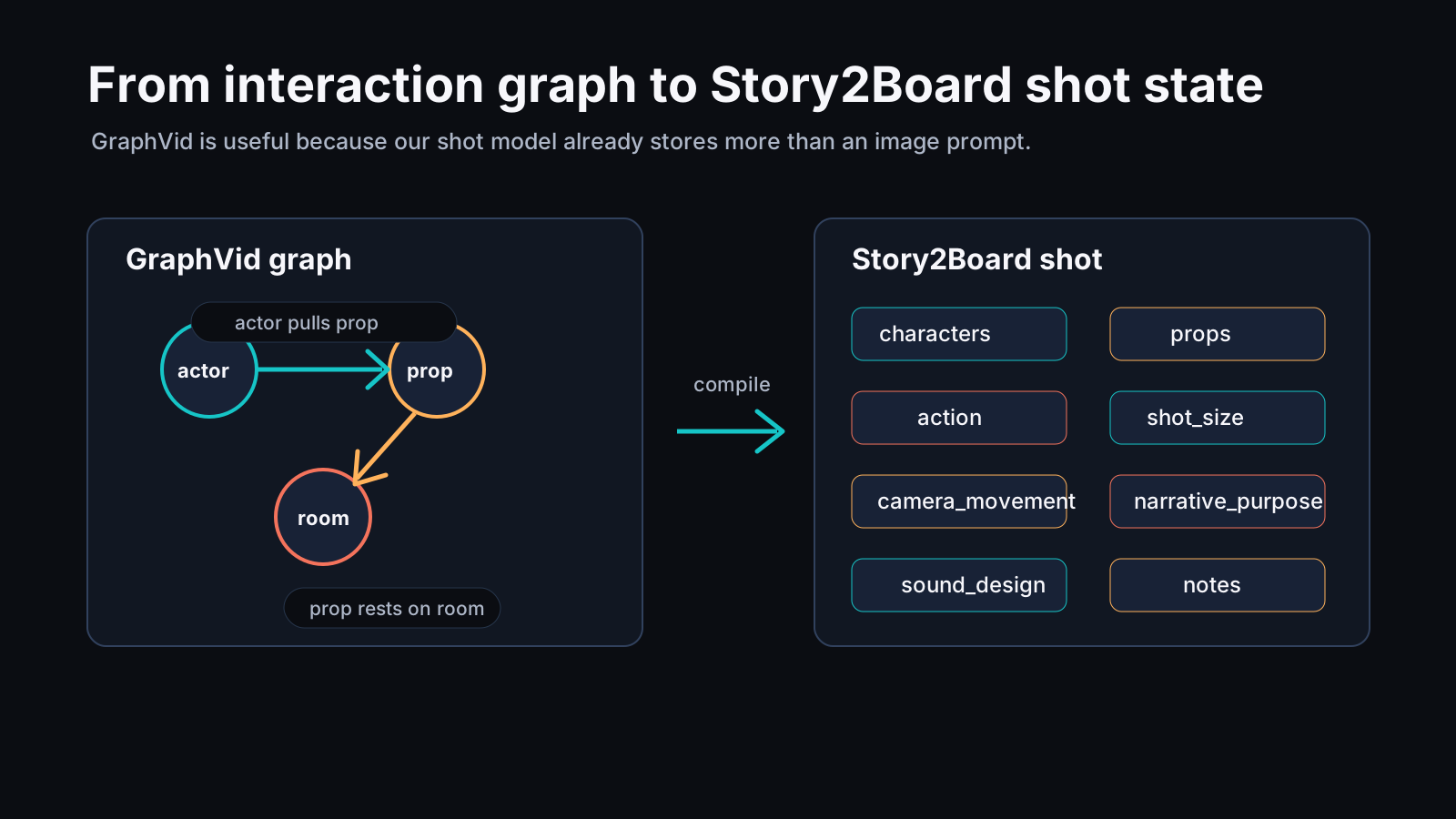
| GraphVid concept | Story2Board equivalent |
|---|---|
| Node | character, prop, location element |
| Edge | action relation between entities |
| Edge text | action plus notes, e.g. "pulls curtain upward" |
| Direction | actor-to-target causality |
| Physical attributes | coarse direction, strength, contact, support |
| No-interaction clip | atmosphere or camera-only shot |
| Graph edit | storyboard revision to action/blocking |
This also helps separate three things that are often mixed together:
| Control type | Storyboard field |
|---|---|
| Camera motion | camera_movement, angle, shot_size |
| Object interaction | action, characters, props, notes |
| Narrative meaning | narrative_purpose, emotional_tone, sound_design |
A good AI storyboard system needs all three. GraphVid focuses on the second one.
A graph is a better revision target than a prompt
The most useful product idea is not hidden inside the model. It is the edit loop.
Suppose a creator has a shot:
Action: Lina grabs the letter from the table before Marcus notices.
Characters: Lina, Marcus
Props: letter, table
Camera movement: slow push-in
Narrative purpose: hide the clue in plain sight
A prompt-only video preview might animate Lina, Marcus, the table, and the letter in some plausible way. If the result is wrong, the creator has to rewrite the prompt and hope the model changes the right part.
A graph edit is more direct:
Lina --grabs / toward body / medium--> letter
letter --rests on--> table
Marcus --does not see--> letter
camera --pushes in slowly--> Lina and table
If the letter moves too early, edit the edge timing. If Marcus reacts too soon, change the visibility relation. If the camera move dominates the action, adjust the camera edge separately from the object edge.
This is closer to how boards are reviewed. Directors do not only ask whether an image looks nice. They ask whether the action reads.
Where GraphVid is limited
The paper is careful about scope. GraphVid is an image-to-video control method for short clips. It is not a full story planner, not a production editor, and not a guarantee of long-range character continuity.
Several limits matter for Story2Board:
| Limit | Why it matters |
|---|---|
| Short 81-frame clips | useful for previews, not full scenes |
| Interaction dataset filters out camera-dominant motion | camera grammar still needs its own control layer |
| Graph construction depends on detected objects and VLM labels | bad detection can create bad control |
| Open-vocabulary edge text can still be ambiguous | "hold" and "support" may need project-specific rules |
| The paper uses benchmark metrics, not production storyboard review | creator judgment remains necessary |
The safety note is also relevant. The authors mention the risk of realistic video generation being used for deceptive media and point to safeguards such as watermarking, provenance, and detection. A storyboard preview product should keep preview context explicit. The goal is planning and iteration, not hiding provenance.
How I would use this in Story2Board
The near-term product path is not to expose a scary graph editor to every user. It is to let the storyboard interface create the graph behind normal controls.
- The creator fills or edits a shot.
- The system identifies active characters, props, and location elements.
- The action field is compiled into directed relation candidates.
- The user confirms or edits the relation in plain language.
- The preview model generates a short clip.
- The review UI highlights the relations that the generated clip appears to satisfy or violate.
This keeps the user-facing workflow simple while still giving the model a more structured signal than a paragraph.
It also fits the broader research pattern we have been tracking. ShotPlan gives explicit control over cut timing. WorldWeaver argues for persistent state across generated chunks. GEST-Engine treats events as the source of synthetic video. GraphVid adds a missing piece: local object interaction inside a shot.
For Story2Board, those pieces point to a practical stack:
| Layer | Research neighbor | Product role |
|---|---|---|
| Project memory | WorldWeaver | keep characters, props, and layout stable |
| Scene/event plan | GEST-Engine | define what happens and why |
| Shot timing | ShotPlan | place cuts and camera beats |
| Object interaction | GraphVid | control who acts on what |
| Visual consistency | CANVAS-style workflow | keep references and continuity checks |
That is a stronger storyboard-native model than "write a better prompt."
The takeaway
GraphVid is useful because it makes interaction editable. It gives the creator a handle that is closer to blocking, action, and prop continuity than trajectory drawing is.
For Story2Board, the design implication is straightforward: keep the shot as structured state, compile active relations into a graph, and use that graph to drive motion previews. The graph does not need to be visible all the time. But it should exist somewhere, because the video model needs to know more than what the frame looks like.
Reference
Shah, V., Susladkar, O., Prakash, T., Nguyen, K. A., Yu, T., Juvekar, A., Waheed, M., & Lourentzou, I. (2026). GraphVid: Interactive Graph-Controllable Video Generation. arXiv. https://arxiv.org/abs/2607.21580
All diagrams were created by the Story2Board team for this analysis.