Storyboard template pages on the web are not all competing for the same user. They look similar because they share panels, but the audience behind each page is different.
After reviewing current storyboard template pages from film, design, education, marketing, eLearning, and collaborative whiteboard tools, the pattern is clear: "storyboard template" is a family of jobs, not one file.
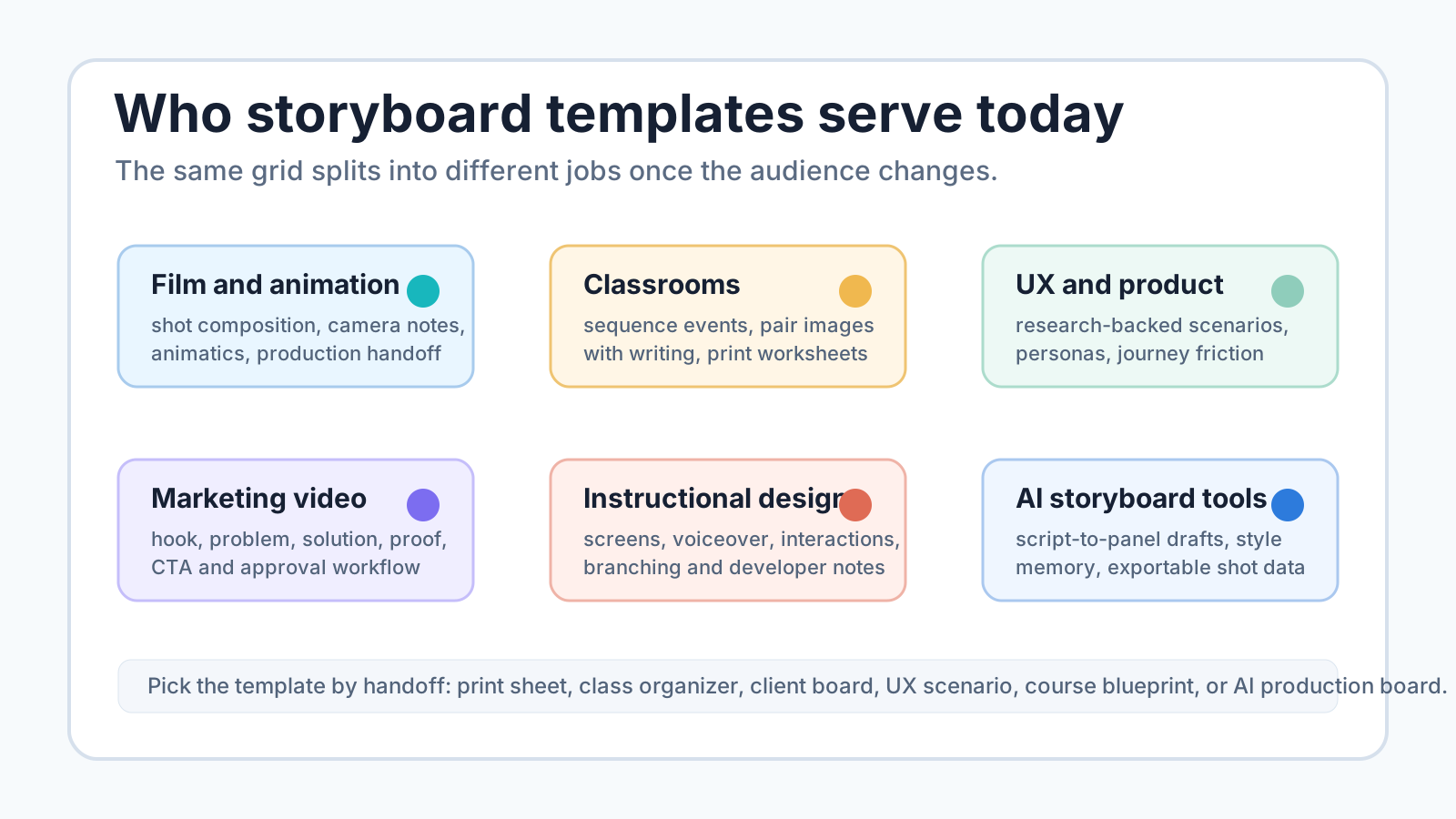
For Story2Board, that matters. A blank PDF can serve a student or a quick pre-production sketch. It cannot cover every need a film team, marketer, UX researcher, instructional designer, or AI storyboard workflow has.
The current storyboard template market in one map
| Template category | Main audience | Main scenario | What the best pages emphasize |
|---|---|---|---|
| Film and video production | directors, producers, cinematographers, storyboard artists | shot planning before filming | aspect ratio, panel count, camera notes, shot descriptions, production handoff |
| Animation and motion design | animators, motion designers, agencies | scene flow and timing | frame sequence, transitions, action, animatic-friendly structure |
| Marketing video | marketers, brand teams, video agencies | ads, explainers, testimonials, campaigns | hook, problem, solution, proof, CTA, approvals |
| Education | teachers and students | visual writing, story sequence, class assignments | simple cells, printability, picture-to-event connection |
| UX and product | designers, researchers, product teams | user scenarios, customer journeys, product flows | personas, touchpoints, pain points, research evidence |
| eLearning and instructional design | instructional designers, SMEs, course developers | online course production | slide titles, onscreen text, audio scripts, navigation, interactions, developer notes |
| AI storyboard workflows | creators and teams moving from script to generated frames | editable visual planning with consistency | promptable panels, shot metadata, style consistency, PDF export, revision control |
The common mistake is treating all of these as "download a grid." A filmmaker needs a camera-aware sheet. A teacher needs a student-safe organizer. A UX team needs evidence and scenario flow. An instructional designer needs a developer-ready blueprint.
That is also why search results around this keyword feel crowded. Many pages use the same phrase, but their product promise is different. One page is a PDF library. Another is a design canvas. Another is a classroom worksheet. Another is a UX workshop format. Another is a production approval system.
When judging a storyboard template page, I look for five signals:
| Signal | What it proves |
|---|---|
| Audience named early | the page knows who the template is for |
| File or workspace explained | the user knows whether they are downloading, editing, printing, or collaborating |
| Fields match the job | the template captures the decisions that audience actually needs |
| Example or preview is visible | the user can inspect the layout before committing |
| Next handoff is clear | the page explains what happens after the template is filled |
Pages that miss those signals tend to feel interchangeable, even if their graphics are polished.
Film template pages: built around shots and handoff
Film and video pages usually speak to people who need to plan before production. StudioBinder says its storyboard templates are for video, film, TV, animation, or pitching a story, and offers files such as PDF, Photoshop, PowerPoint, and Word. Source: StudioBinder storyboard template PDF.
Boords goes narrower on template structure. Its free template page lists A4 PDF layouts with different panel counts and also points to specialist templates such as motion design, eLearning, TV commercial, and music video boards. Source: Boords free storyboard templates.
The audience is practical. They want to know:
- how many panels fit on a page;
- whether the page is portrait or landscape;
- whether the aspect ratio matches the final video;
- where action and camera notes go;
- whether the file can be printed, shared, or edited.
For Story2Board, this is why our free storyboard template hub separates PDF download, PNG preview, and editable AI boards. A static PDF is useful, but film planning quickly wants shot data.
Digital creator pages: built around speed and collaboration
Canva's storyboard creator is not mainly a film production binder. It is a broad creator tool. The page emphasizes drag-and-drop editing, stock photos and graphics, AI media generation, and inviting others to collaborate. It also says the tool is suited to planning a video project and sharing with clients. Source: Canva storyboard creator.
Milanote's filmmaking template speaks to a slightly different crowd: filmmakers, creative directors, and clients. Its page says the template works for short film storyboards, documentary storyboards, and feature film storyboards, and it asks users to drag images into columns and describe actions. Source: Milanote filmmaking storyboard template.
These pages are not selling "printable worksheet first." They are selling a workspace:
| Page type | What it gives the user |
|---|---|
| Canva-style creator | quick visual assembly, brand-friendly design, collaboration |
| Milanote-style board | mood, images, actions, client-facing creative boards |
| Boords-style production tool | storyboards, animatics, comments, approvals |
| Story2Board-style AI board | script breakdown, visual consistency, shot metadata, exportable planning |
This is where the modern storyboard template becomes less about paper and more about review.
Marketing pages: built around persuasion structure
Marketing video templates usually care less about lens language and more about persuasion flow.
Boords' marketing video guide tells users to start with a pre-production plan, then positions the template around a marketing sequence. The guide lays out steps such as hook, problem, solution, doubts, and call to action. It also recommends production fields such as Sound, Action, Lighting, Camera, and Notes. Source: Boords marketing video storyboard guide.
Miro's storyboard examples page also connects storyboards to marketing campaigns, product launches, and customer journeys. It says templates can help map campaign steps, messaging themes, timelines, and touchpoints. Source: Miro storyboard examples.
The audience is usually a brand team, agency, or solo marketer trying to reduce the risk of a shoot or campaign. A strong marketing storyboard template answers:
- what is the hook;
- what problem is shown;
- when the product appears;
- what proof removes doubt;
- where the call to action lands;
- who must approve the board before production.
That is a different template from a blank 6-panel film sheet.
Classroom templates: built around sequence and comprehension
Education pages often use storyboard templates as graphic organizers rather than production documents.
Education World describes a storyboard template as a graphic organizer that helps students visually present story details and the sequence of events. It also offers editable Word and PDF versions, plus different panel counts. Source: Education World storyboard template.
Storyboard That has a large education-facing template universe, including student templates, comic strips, visual writing assignments, and teacher-customizable layouts. Source: Storyboard That student templates.
The classroom audience wants low friction:
| Classroom need | Template implication |
|---|---|
| students understand sequence | use simple panels |
| teacher prints worksheets | keep page clean and black-and-white friendly |
| students connect picture and event | reserve space for short captions |
| younger students avoid tool friction | keep fields minimal |
| assignment reuse | make the template editable or duplicable |
This is why "more fields" is not always better. A student worksheet should not look like a film production report.
UX and product pages: built around researched scenarios
UX storyboard templates are not about filming a scene. They are about making user behavior visible.
Figma's UX storyboard guide starts with goal-setting and tells teams to use design research, briefs, mood boards, and usability tests to identify storyboard subjects. Source: Figma UX storyboard guide.
Nielsen Norman Group frames storyboards as visual representations of UX stories that capture attention, provide clarity, and inspire action. Source: NN/g, Storyboards Help Visualize UX Ideas. Miro's examples page maps storyboards to product development and customer journeys, including touchpoints, pain points, personas, and opportunities for improvement. Source: Miro storyboard examples.
A UX storyboard template should leave room for:
- user or persona;
- context;
- goal;
- trigger;
- action;
- emotional state;
- friction point;
- product opportunity;
- research note.
That is why UX teams can use storyboard templates even when no video will ever be produced.
eLearning pages: built around production detail
Instructional design pages treat storyboard templates as course blueprints.
Cathy Moore's instructional design guide says an eLearning storyboard outlines course components from graphics to videos to onscreen text. It lists expected elements such as titles, numbers, dates, onscreen text, audio scripts, navigation buttons, mockups, branching scenarios, and developer notes. Source: Cathy Moore instructional design storyboard.
The University of Maryland Baltimore's Faculty Center for Teaching and Learning offers storyboard templates for course learning outcomes, objectives and assessments, and resources and activities. Source: UMB storyboard templates.
An eLearning storyboard template fails if it only has picture boxes. The course team needs to hand work to designers, voice talent, developers, reviewers, and stakeholders. The template needs fields for what appears on screen and what happens behind the screen.
Broad visual-design pages: built around easy customization
Some storyboard template pages are closer to design template marketplaces than production guides.
Canva's template directory promises free, editable, printable storyboard templates for planning a video. Source: Canva storyboard templates.
These pages serve users who already know they need a layout but may not know the exact production fields. Their strength is accessibility:
- quick start;
- editable visuals;
- familiar design tools;
- printable output;
- classroom or lightweight project fit.
Their weakness is that they may not preserve production logic unless the user adds it.
Where Story2Board fits
Story2Board should not pretend a blank PDF solves every storyboard problem. It should own a specific bridge:
----------------------+
| script or idea       |
+----------+-----------+
           |
           v
+----------------------+
| structured template   |
| beat, camera, audio   |
+----------+-----------+
           |
           v
+----------------------+
| AI storyboard draft   |
| consistent frames     |
+----------+-----------+
           |
           v
+----------------------+
| export and review     |
| PDF-style handoff     |
+----------------------+
That is the useful position between simple template sites and full production tools. Story2Board can still offer printable PDFs, but the stronger promise is editable planning: script breakdown, shot data, visual consistency, generated frames, and exportable review materials.
The gap is especially visible in three jobs.
First, recurring characters and props create continuity work that a blank sheet cannot remember. A paper panel can say "same jacket," but it cannot keep the jacket consistent across new generated frames.
Second, revisions create version confusion. Marketing and client boards often fail because the team discusses the wrong export, the wrong comment thread, or the wrong frame number. That is why approval-oriented tools emphasize comments, versions, and shared workspaces.
Third, production handoff needs more than a pretty frame. A cinematographer, editor, teacher, researcher, or course developer needs different metadata. Story2Board's opportunity is to keep that metadata attached to visual panels instead of scattering it across scripts, notes, and chat threads.
So the template page should not fight every industry page head-on. It should make a clearer promise: use the printable template when you need a sheet; use the AI board when the sheet needs memory. That is how our own template pages are built — four sheets, each stating what it covers and where it stops.
How to choose the right storyboard template page
Use the audience first, not the file format.
| You are... | Start with... | Move to Story2Board when... |
|---|---|---|
| a student or teacher | printable classroom template | the assignment needs generated frames or film-style shot fields |
| a filmmaker | 4-panel, 6-panel, dialogue, or vertical video PDF | the board needs character, prop, camera, and revision memory |
| a marketer | marketing video storyboard | the campaign needs multiple visual drafts and approvals |
| a UX designer | UX scenario storyboard | the scenario needs visual presentation or concept video planning |
| an instructional designer | eLearning storyboard | the lesson needs visual production, narration, and exportable review |
| a creator with a script | editable AI storyboard | the goal is to turn script beats into consistent visual panels |
The best storyboard template is not the one with the most boxes. It is the one that matches the next handoff.
Source notes
| Source | Specific fact used |
|---|---|
| StudioBinder storyboard template PDF | More than 60 free templates; audiences include video, film, TV, animation, and pitching; formats include PDF, Photoshop, PowerPoint, and Word. |
| Boords free storyboard templates | Free A4 PDF layouts with different panel counts; specialist template categories such as motion design, eLearning, TV commercial, and music video. |
| Boords marketing video storyboard guide | Marketing video workflow includes pre-production, hook/problem/solution/doubt/CTA structure, and custom fields such as Sound, Action, Lighting, Camera, and Notes. |
| Canva storyboard creator | Emphasizes drag-and-drop editing, stock media, AI media generation, collaboration, and client sharing. |
| Canva storyboard templates | Positions templates as free, editable, and printable for planning video projects. |
| Milanote filmmaking storyboard template | Targets filmmakers, creative directors, and clients; includes short film, documentary, and feature-film use cases. |
| Figma UX storyboard guide | Grounds UX storyboards in goals, research, briefs, mood boards, and usability tests. |
| NN/g UX storyboards | Frames storyboards as visual UX stories that clarify ideas and support action. |
| Education World storyboard template | Treats storyboard templates as graphic organizers for students to visualize story details and sequence events. |
| Cathy Moore instructional design storyboard | Lists eLearning storyboard components including onscreen text, audio scripts, navigation, mockups, branching scenarios, and developer notes. |
| UMB storyboard templates | Shows higher-education course-design templates for learning outcomes, objectives and assessments, and resources and activities. |