Storyboard templates did not begin as stationery. They began as a way to make a moving story visible before the expensive work started.
The old problem was simple: a script could describe action, but it could not show whether a sequence worked when shots were placed next to each other. A storyboard template solved that by giving the team a repeatable surface: one frame after another, with enough space for action, camera, timing, dialogue, sound, and revision notes.
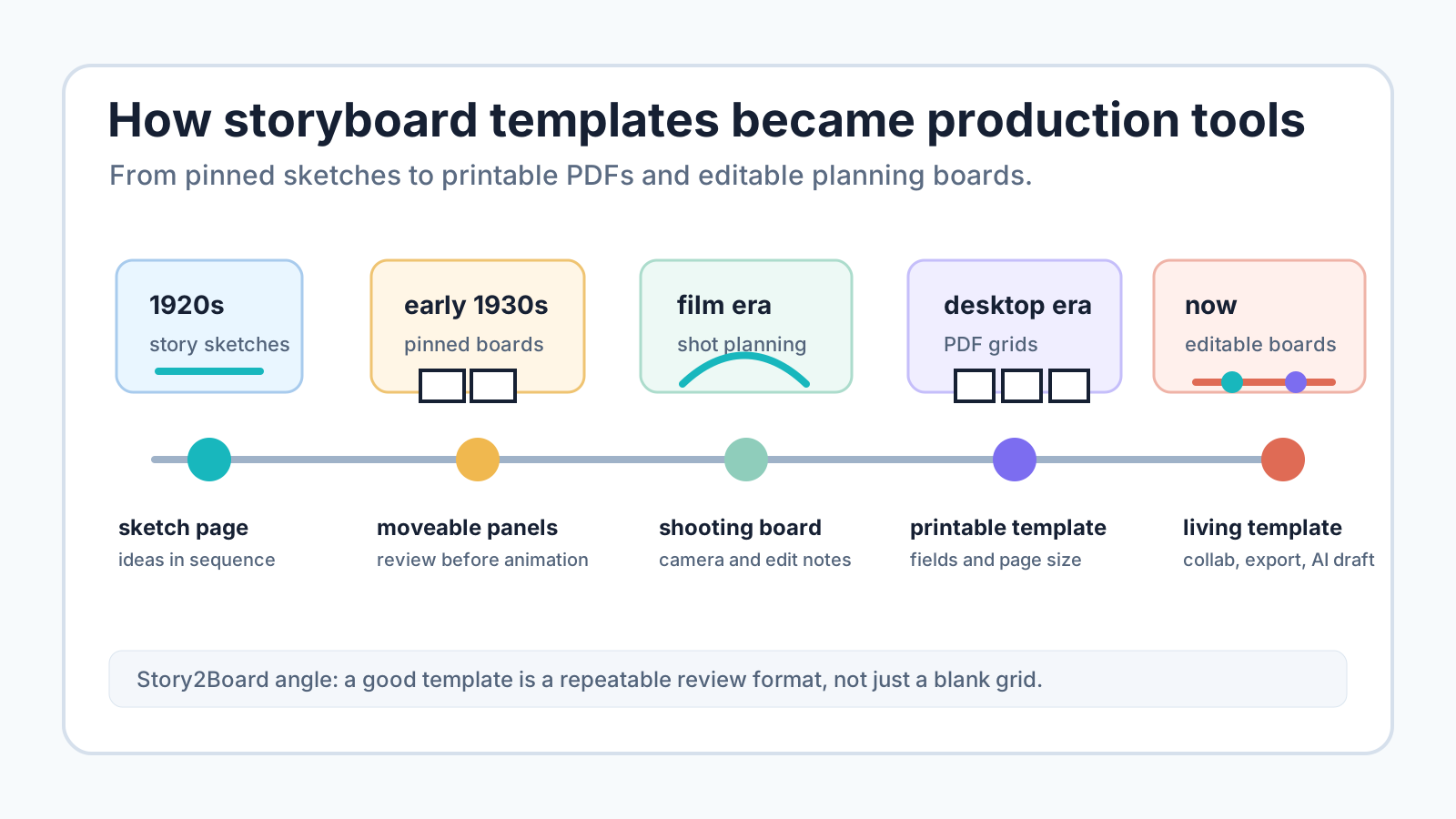
This history matters because people still search for a storyboard template as if it is only a blank grid. The grid is the least interesting part. The real invention was the review format: a way to pin down story decisions, move them around, and catch problems before production.
Before templates, there were story sketches
Early story planning was not standardized. Production teams used sketches, set drawings, continuity drawings, written treatments, and other pre-production materials, but those materials did not all do the same job.
A useful distinction appears in Hiaw Khim Tan's review of Chris Pallant and Steven Price's Storyboarding: A Critical History. The review notes that storyboards are about sequentially mounted images that visualize developing action and narrative, while concept art and production art can serve different design tasks. The same review also describes early Disney material from Plane Crazy (1928) as six panels on a page with typed action notes. That is close to a template already: repeated frames, ordered action, and text beside the pictures. Source: Alphaville, Issue 17.
That early form explains why storyboard templates became useful. A single drawing can show a look. A page of repeated panels can show change.
Disney turned the board into a production system
The modern storyboard is usually traced to Walt Disney's studio in the early 1930s. Disney's D23 entry on storyboards credits Disney storyman Webb Smith with the idea and describes 4-by-8-foot boards with story sketches pinned in order. D23 also says Disney artists found that easier to visualize than reading a script. Source: D23, "Storyboards".
That physical board is the ancestor of the template. It had three ideas that still matter:
| Board habit | Why it mattered then | What survives in templates |
|---|---|---|
| Separate sketches | a scene could be added, removed, or moved | individual panels |
| Fixed sequence | the team could walk the story in order | numbered frames |
| Shared wall review | artists, writers, and directors could argue over the same object | notes, comments, approvals |
The template was not just a page layout. It was a production meeting made visible.
The format created a new kind of story labor
The Alphaville review gives another important piece of the history: as Disney grew in the late 1920s and early 1930s, a story department formed, including Webb Smith. The review says Smith preferred to design visual sequences by sketching rather than writing descriptions, and that wall-pinned sketches later became portable corkboards.
That changed the job. A writer could propose a scene, but a storyboard artist could test whether the scene cut together. The template made that labor legible: frame, action, cut, frame, action, cut.
This is still why a good storyboard template should not ask only for "drawing" and "notes." It should preserve the decisions that make visual story work:
- what changes in the beat;
- where the camera is;
- what the viewer should notice first;
- which character or prop must stay consistent;
- what sound, dialogue, or transition changes the edit;
- what the next team needs to know.
Live-action changed the purpose of the template
Animation gave storyboards a natural home because every frame was manufactured. Live-action introduced a different problem: the board had to negotiate with locations, lenses, lighting, actors, weather, budget, and editorial continuity.
The same Alphaville review describes production designer William Cameron Menzies's pre-staging work as a bridge between printed words and film images. It also notes that his 1920s work approached design through the eye of the camera, with attention to composition and shot-to-shot continuity. Source: Alphaville review of Storyboarding: A Critical History.
That is the moment the storyboard template starts becoming a shot planning document. The panel is no longer only "what happens." It also asks:
| Field | Why live-action needs it |
|---|---|
| Shot size | tells the crew how close the camera is |
| Angle | tells the team what the viewer knows |
| Movement | tells grip, camera, and blocking teams what must be possible |
| Lighting note | protects mood and continuity |
| Location constraint | keeps the sketch honest |
| Edit note | warns the editor what the shot is meant to connect to |
If a template lacks these fields, it may still be fine for a classroom exercise. It is weaker as a production handoff.
Printable templates made the board portable
Once storyboards moved from walls to paper, the template became a repeatable document. A blank comic-strip style page could be printed, copied, marked up, and put in a binder.
That is why today's printable storyboard template pages still emphasize file format and page size. StudioBinder says its storyboard template pack includes more than 60 free templates and formats such as PDF, Photoshop, PowerPoint, and Word. Source: StudioBinder storyboard template PDF page. Boords lists A4 portrait PDF templates with different panel counts, including 4-panel and 6-panel versions. Source: Boords free storyboard templates.
The printable era added a new question: not "can the story be seen?" but "can this sheet survive the next handoff?"
That is where PDF became important. A PDF preserves page geometry. A 4-panel sheet gives room for notes. A 6-panel sheet supports thumbnailing. A dialogue template can reserve space for eyeline, speaker, listener, and sound. A vertical template can protect 9:16 safe areas and captions.
Those four shapes survived the move to screens largely unchanged, which is why they are the four we still publish as downloadable storyboard sheets.
Digital tools turned templates into shared workspaces
The next shift was not only from paper to screen. It was from a static sheet to a collaborative object.
Canva's storyboard creator describes drag-and-drop editing, stock media, AI media generation, and team collaboration for video planning. Source: Canva storyboard creator. Milanote's filmmaking template is written for filmmakers, creative directors, and clients, and frames storyboarding as a modern process for short films, documentaries, and features. Source: Milanote film storyboard template. Boords positions some workflows around storyboards, animatics, comments, and approvals. Source: Boords marketing video storyboard guide.
The template became less like a form and more like a small production room:
| Old printable template | Digital template |
|---|---|
| fixed page size | expandable board |
| handwritten markups | comments and approvals |
| one exported version | version history |
| visual only | animatic timing and sound |
| local file | shared workspace |
This is also where "storyboard template" began to mean different things in different industries.
Templates left film and entered classrooms, UX, and training
Education pages use storyboard templates as graphic organizers. Education World describes a storyboard template as a way for students to visualize story details and sequence events by breaking a story into individual cells. Source: Education World storyboard template.
UX teams use storyboards differently. Figma's UX storyboard guide tells teams to set a goal, define the purpose, and use design research such as briefs, mood boards, and usability tests to choose storyboard subjects. Source: Figma UX storyboard guide. Nielsen Norman Group summarizes UX storyboards as visual representations of UX stories that clarify ideas and inspire action. Source: NN/g storyboards for UX ideas.
Instructional designers use templates differently again. Cathy Moore's guide says an eLearning storyboard outlines course components from graphics to video and onscreen text, then lists items such as slide titles, voiceover notes, navigation buttons, mockups, and branching scenarios. Source: Cathy Moore instructional design storyboard.
The template survived because the unit stayed the same: a sequence of frames with decisions attached. The audience changed.
AI did not remove the template. It raised the bar for it.
AI storyboard tools can draft frames faster than a blank PDF can. That does not make templates obsolete. It makes weak templates more obvious.
If a template only stores a sketch box and a sentence, AI can quickly outrun it. If a template stores story beat, shot size, camera movement, character state, prop continuity, sound, timing, and revision notes, it becomes a useful control layer for AI generation.
That is the Story2Board view: the future of the storyboard template is not a prettier blank page. It is a structured board that can move between human planning, AI frame generation, PDF export, and production review.
What the history says about choosing a template
The history points to a practical rule:
| If you need... | Choose... |
|---|---|
| quick sketching | a 4-panel printable template |
| more thumbnails per page | a 6-panel printable template |
| classroom sequencing | a simple graphic organizer |
| dialogue coverage | a template with speaker, eyeline, sound, and reaction fields |
| UX research | a scenario template based on user evidence |
| eLearning production | a slide-level template with scripts, media, navigation, and developer notes |
| AI storyboard generation | an editable board that stores shot data and consistency notes |
The useful question is not "what is the newest storyboard template?" It is "what decision will this template help the next person make?"
Source notes
| Source | Specific fact used |
|---|---|
| D23: Storyboards | Credits Webb Smith at Disney in the early 1930s; describes 4-by-8-foot boards with pinned story sketches; notes spread into motion-picture use. |
| Alphaville review of Storyboarding: A Critical History | Explains storyboards as sequential mounted images, discusses Disney's story department, Webb Smith's visual sketching, Plane Crazy story sketches, and Menzies's pre-staging. |
| StudioBinder storyboard template PDF page | Shows modern downloadable template packs across PDF, Photoshop, PowerPoint, and Word. |
| Boords free storyboard templates | Shows current A4 PDF storyboard templates with different panel counts and specialist use cases. |
| Canva storyboard creator | Shows drag-and-drop, stock media, AI media, and collaboration as current template features. |
| Milanote film storyboard template | Frames the film storyboard template for filmmakers, creative directors, clients, short films, documentaries, and features. |
| Education World storyboard template | Describes student storyboard templates as graphic organizers for sequence and story details. |
| Figma UX storyboard guide | Grounds UX storyboards in goals, design research, briefs, mood boards, and usability findings. |
| Cathy Moore instructional design storyboard | Lists eLearning storyboard components such as onscreen text, audio scripts, navigation, mockups, and branching scenarios. |