The cheapest moment to discover that a scene does not work is while it is still five rectangles on a screen.
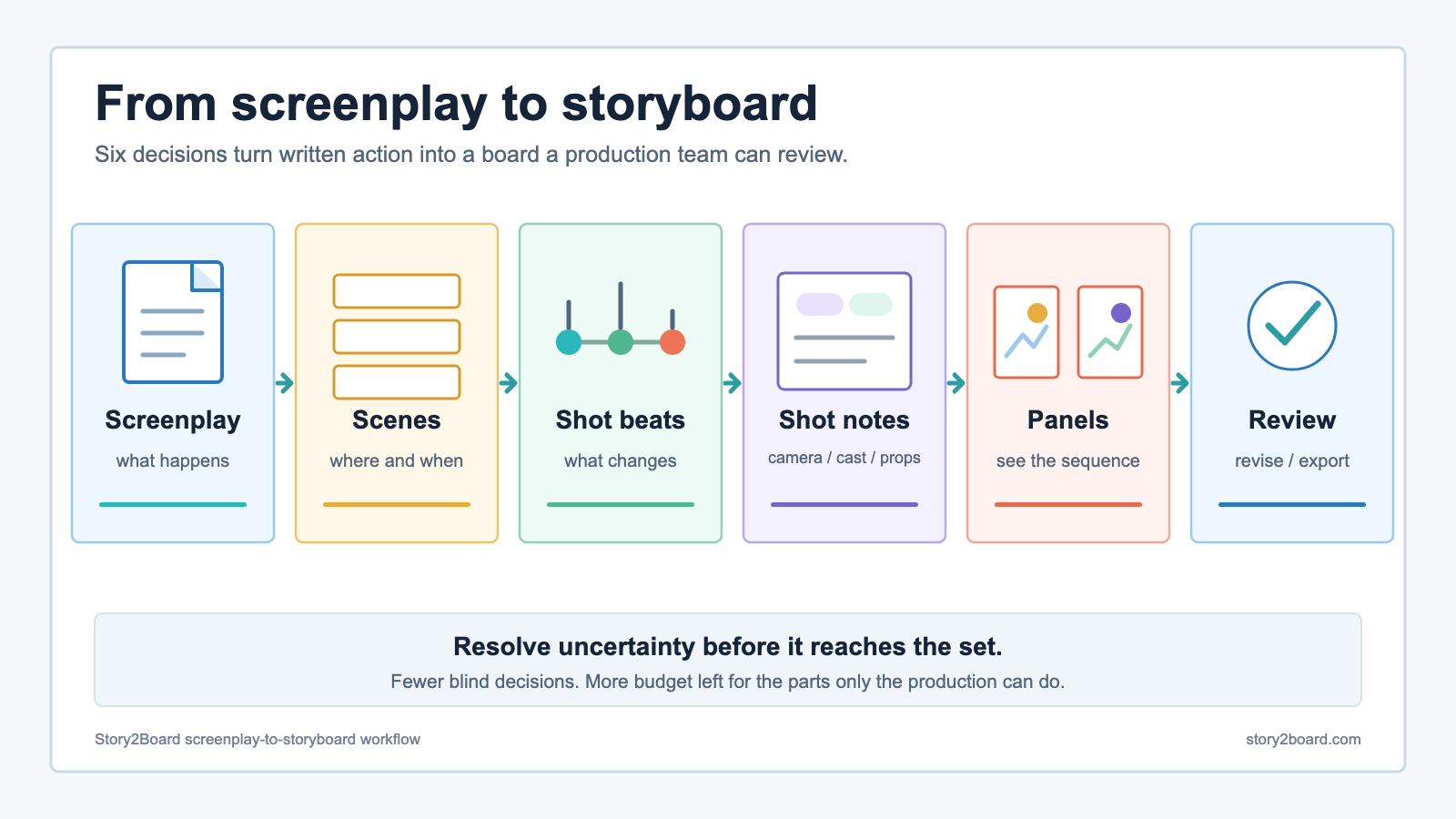
A screenplay can become an AI storyboard in six passes: separate it into scenes, mark the visual beats, plan the shots, attach camera and continuity notes, generate the panels, then review the sequence as a production document.
The order matters. If you ask for pictures before deciding where the scene changes, you get attractive frames with no editorial logic. If you make the shot decisions first, AI becomes useful for the slow part: turning those decisions into something the director, cinematographer, editor, client, or small crew can see and challenge.
That is also where the cost saving begins. The goal is not to remove professional storyboard artists from projects that need them. It is to stop paying production prices to discover basic problems that could have been found while the scene was still text and rough panels.
The expense is uncertainty, not drawing
Consider a two-page interior scene. A character enters a kitchen, notices an envelope, hears a car outside, and decides not to open the envelope. The screenplay gives you the action. It does not automatically answer these questions:
- Do we reveal the envelope before the character sees it, or with her?
- Is the sound outside an off-screen cue, a cutaway, or both?
- Does the scene need one master and two inserts, or five separate setups?
- Which side of the room establishes screen direction?
- What must stay identical when the envelope appears again?
- Can the location physically support the camera position implied by the shot?
If those decisions first appear on set, every answer touches people, time, equipment, and schedule. A rough board moves the same argument into pre-production, where changing a panel is cheaper than relighting a room or rebuilding coverage in the edit.
Professional storyboarding is skilled work, and its price reflects that. Fiverr's 2026 marketplace guide lists a typical range of $400 to $900 for intermediate film and video boards containing 15 to 30 panels. The same guide notes that detail, turnaround, revisions, and technical specialization all affect the final price. Those figures are Fiverr marketplace estimates, not a universal industry rate, but they make the budget pressure on a short film easy to see.
An AI first pass changes when you spend that money. A filmmaker can test the scene, discard weak coverage, and arrive at a more stable brief before commissioning polished boards. On a no-budget project, the first pass may be the only board the crew can afford. On a larger project, it can make the artist's paid time more focused.
What has to be added between screenplay and storyboard
ScreenSkills describes the storyboard artist's job as translating the script and director's vision into panels that plan shots and maintain continuity. That definition contains the part many AI workflows skip: a storyboard is not an illustrated screenplay. It is a sequence of production decisions.
| The screenplay gives you | The storyboard must add |
|---|---|
| scene heading | usable view of the location |
| action and dialogue | visual beat and panel boundary |
| character intention | performance, blocking, and eyeline |
| important object | when and how the audience sees it |
| pace on the page | shot duration and editorial rhythm |
| tone | framing, lens feel, light, and color direction |
Adobe's storyboarding guide makes a useful distinction: a board can be rough as long as it communicates information and emotion clearly. That is the right standard for an AI draft. A beautiful panel with the wrong eyeline is less useful than a crude panel that tells the crew exactly where the character is looking.
A six-pass screenplay-to-storyboard workflow
1. Work one scene at a time
Uploading a feature-length screenplay in one go is possible, but it is not a good directing method. Start with one scene that has a clear beginning, turn, and ending. Scene-sized work makes it easier to catch omissions and prevents a model from smoothing every moment into the same generic coverage.
For example, here is an original mini-scene we can actually plan:
INT. APARTMENT KITCHEN - DAWN
Mara enters, still wearing last night's coat. A sealed red envelope sits on the table. A car door slams outside. Mara looks toward the window, then passes the envelope without touching it.
Before generating anything, write the scene's job in one sentence:
Mara sees the message she has been avoiding and chooses to delay the confrontation.
That sentence is the review standard. If a proposed shot makes the envelope noticeable but loses Mara's avoidance, the shot is not doing the scene's work.
2. Mark changes, not sentences
A new screenplay line does not automatically require a new panel. Add a beat when the audience receives new visual information, attention shifts, the power relationship changes, or an action creates a new state.
The kitchen scene has five useful visual beats:
- Mara enters and the room is established.
- The red envelope becomes important.
- The car door changes her attention.
- She checks the window.
- She refuses the envelope and leaves it sealed.
This is the first cost-control decision. Five purposeful panels are more useful than generating separate images for every sentence and sorting them afterwards.
3. Turn each beat into a shot proposal
Now decide what the audience sees and why. Keep the first pass compact enough to compare as a sequence.
| Beat | First shot proposal | Narrative reason |
|---|---|---|
| entrance | wide shot from inside the kitchen | establishes Mara, table, window, and screen direction |
| envelope | insert of the sealed red envelope | gives the object weight before dialogue explains it |
| outside sound | medium close-up on Mara | lets the sound trigger a visible reaction |
| window check | over-the-shoulder toward the window | preserves her point of view without revealing too much outside |
| refusal | close-up of her hand stopping short | turns "does not open it" into a visible decision |
Do not treat these proposals as commands from the model. Ask for an alternate when the first idea is too expensive, too conventional, or wrong for the emotion. The same scene could be staged in one slow master, for example. The board exists so those alternatives can be compared before the shooting plan hardens.
4. Add camera, character, prop, and location state
Image prompts describe a frame. Production notes keep one frame connected to the next.
For the kitchen scene, the minimum state is:
| State | Locked detail |
|---|---|
| character | Mara, late 20s, dark green coat, tired posture |
| prop | red envelope, sealed, no writing visible |
| location | table left of frame, window on back wall |
| time and light | dawn, cool exterior, weak warm practical light |
| screen direction | Mara enters from camera right and looks frame left |
| story state | envelope remains sealed through the final panel |
This table does more to prevent drift than repeatedly adding "same character" to a prompt. It tells the team what must persist and what may change.
In Story2Board's AI storyboard generator, you can paste a scene or upload a PDF, Word, or text script. The AI co-director proposes framing, angle, camera movement, and composition before panels are generated. Characters, locations, and props can be kept as project assets, so revision is tied to the production state rather than to an isolated image prompt.
5. Generate anchor panels before full coverage
Generate the shots that define the scene first:
- the establishing frame that fixes geography;
- the clearest character frame that fixes appearance and wardrobe;
- the prop frame that fixes the envelope;
- the emotional turn that the sequence cannot work without.
Review those anchors before spending credits on reactions, inserts, or alternate coverage. If the kitchen layout is wrong in panel one, every later angle will inherit the problem. If Mara's coat changes in the first close-up, lock the reference before generating the remaining shots.
Do not regenerate a useful planning frame because of a small cosmetic defect. A storyboard panel has earned its place when the composition, action, direction, and story beat are readable. It does not need to look like a final film still.
6. Read the board as an edit, then export it as a plan
Review the panels in order without looking back at the screenplay. Ask:
- Can someone understand the action from the images and notes?
- Is the envelope introduced before its reaction shot depends on it?
- Does Mara look in a consistent screen direction?
- Does every cut reveal information or change emphasis?
- Is one expensive setup doing work that a simpler shot could do?
- Are sound, duration, camera movement, and transition notes attached to the right panel?
Then export the board and put it in front of the people who will challenge it. A cinematographer may flag an impossible camera position. An editor may ask for a bridge shot. An actor may notice that the emotional turn happens too early. Those are successful findings, not failures of the storyboard.
How the workflow lowers cost in practice
"AI saves money" is too vague to plan around. The savings come from specific changes in when decisions are made.
| Cost pressure | What the first-pass board changes |
|---|---|
| artist time | weak shot ideas can be removed before polished boards are commissioned |
| location time | camera positions and coverage are discussed before the crew arrives |
| revision time | script changes remain connected to affected shots and props |
| generation credits | anchor frames are approved before secondary coverage is made |
| edit risk | missing reactions, inserts, and geography are visible before shooting |
| team communication | everyone reviews the same frame, note, and shot intention |
This does not guarantee a cheaper production. It gives the production more chances to find expensive mistakes while they are still inexpensive to change.
The best use of the saved budget is not automatically "make more AI images." It may be an extra sound recordist day, a location that actually fits the blocking, more rehearsal, a safer stunt plan, or a professional storyboard artist for the sequence where drawing and cinematic judgment matter most.
Can you start for free?
Yes, within clear limits.
New Story2Board accounts currently receive 300 free credits. Those credits can be used to try the co-director and generate initial frames; generation is not an unlimited free service. Exporting a completed PDF board does not cost credits. If you want to make the shot decisions before using any generation credits, start with the free printable storyboard templates and move the selected shots into the generator afterwards.
A sensible free-start test is one short scene, four to six visual beats, and two or three anchor panels. That is enough to learn whether the workflow helps you think. Trying to board an entire screenplay before reviewing the first scene only multiplies the wrong decisions faster.
Where a professional storyboard artist still matters
AI is strongest at giving a filmmaker something concrete to react to. A storyboard artist does more than render instructions. An experienced artist can improve staging, performance, continuity, action clarity, and editorial rhythm while working directly with a director.
Bring in an artist when:
- a complex action sequence must be safe, spatially exact, and shootable;
- a client or investor needs presentation-quality boards;
- character acting and comic timing carry the scene;
- the director wants visual alternatives, not just execution of a fixed shot list;
- the production needs clean handoff to animation, VFX, stunts, or multiple units.
The AI draft can still help. It gives the artist a tested scene brief, a location model, continuity constraints, and a record of rejected options. That is a better starting conversation than "make this cinematic."
What AI should not decide for you
The model can suggest coverage. It does not know which moment is emotionally true for your film. Keep these decisions human:
- what the scene is really about;
- when the audience should know more or less than the character;
- which performance deserves the close-up;
- what the actual location, schedule, cast, and safety plan allow;
- when a technically imperfect panel expresses the right idea;
- when the board should be changed because a collaborator found a better scene.
A recent HackerNoon article on screenplay-to-storyboard tools makes a related case for using AI in pre-production before expecting it to deliver a finished movie. The practical extension is this: saved time only matters when it returns control to the filmmaker. If the tool generates more material but makes the scene harder to reason about, it has not reduced the real cost.
FAQ
Can AI turn a complete screenplay into a storyboard?
It can read a full screenplay, but scene-by-scene conversion is easier to direct and review. Start with one scene, approve its visual beats and continuity state, then continue. This catches systematic mistakes before they spread through the script.
How many storyboard panels should a screenplay scene have?
There is no reliable panels-per-page formula. Add a panel when visual information, attention, blocking, camera position, or story state changes. A short dialogue scene may work with four panels; a ten-second action beat may need many more.
Is an AI storyboard the same as a shot list?
No. The storyboard shows framing, blocking, screen direction, and visual sequence. A shot list tracks production fields such as setup, lens, equipment, location, and schedule. Use the storyboard and shot-list guide to decide what belongs in each document.
Do I need to know how to draw?
No. Clear shot decisions and continuity notes matter more than drawing skill in an AI-assisted workflow. You still need to judge whether a panel communicates the intended action and can be produced.
What should I prepare before uploading a screenplay?
Choose one scene, write its narrative purpose, list the characters and important props, and mark any production constraint the model cannot infer. A location photo, wardrobe reference, or existing character image can reduce ambiguity further.
Does the AI storyboard replace the final shooting plan?
No. Treat it as a reviewable visual draft. Confirm the board against the real location, schedule, equipment, cast, safety requirements, and department notes before production.
Start with one scene in the AI storyboard generator. If you would rather settle the beats on paper first, download a 4-panel storyboard template and bring only the approved shots into the AI workflow.